Launching today

Prism
Cursor for hardware engineering
59 followers
Cursor for hardware engineering
59 followers
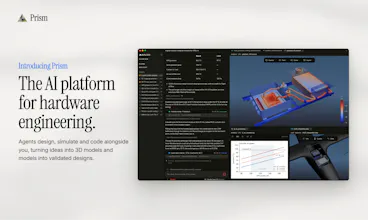
Prism is the AI platform for hardware engineering. CAD, physics solvers, 3D viewers, coding, and reporting together in one place, all driven by agents. Go from ideas to validated design effortlessly. Free to try on Windows, Mac and Linux.





Free Options
Launch Team

Customer.ioAutomate Messaging Everywhere — Startups Get 12 Months Free
Promoted
Hey Product Hunt! I'm Cameron, and I co-founded Navier AI (YC W24) with Evan.
The pain. Before Navier I led vehicle engineering on hydrofoiling container ships at Boundary Layer, worked on autonomous trucks, and analysis for rockets and satellites. Every design change sent us back through Ansys, which meant cleaning up the geometry, re-mesh, resetting the boundary conditions, babysitting the run, checking that it converged, and pasting the plots into slides. Each analysis loop took days. Evan saw the same thing doing additive manufacturing for Raptor at SpaceX, and so did I on Starlink. Some of the best engineers we knew were being throttled by their tools.
That’s why we built Prism: CAD, physics solvers, 3D viewers, a coding environment and reporting in one desktop app, driven by our engineering agents.
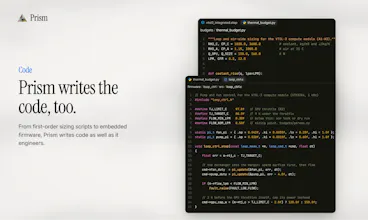
What it's like to use. Prism is an agentic platform and should feel similar to Cursor, Claude Code, etc. However, it's designed for the hardware engineer. Ask it to run a CFD study, design and validate a part, write firmware for your board, or draft your weekly engineering review. It handles the workflow end to end, from the CAD to the simulations to the final report.
If you've used Cursor, it'll feel familiar. You chat with the agent, and it works directly on the files on your machine. Use STEP files, test data or old reports as context, and open or edit anything it produces. Every script, mesh and solver input is a file in your project, so you can review it the way you'd review a colleague's work.
Prism is free to try. Download it for Windows, Mac or Linux at navier.ai/prism. Point it at one of your real engineering problems and tell us:
What cool things did you build with the agent?
Where did it get something wrong?
Which solver, CAD tool or plugin should we add next?
Evan and I and the whole team are here all day. Excited to see everything you build!
The assumptions behind a simulation belong beside its result. I'd want the next person reading the report to see the inputs that produced it.
@oleksii_sekundant Totally agree! That why when the agent runs simulations in Prism, the underlying config files and logs are all available. When they create engineering reports, you can ask the agent to include them.
You also have the ability to create custom reporting templates in Prism, so if there are specific assumptions you want to always see (or don't want to see) you can have that applied by the agent every time.