
Quick Sub 2: Video Subtitling
Quick, creative video subtitling with direct canvas control.
122 followers
Quick, creative video subtitling with direct canvas control.
122 followers
Quick Sub 2 is a streamlined macOS application built from the ground up in SwiftUI for creative video subtitling. Get independent control over text styling, container geometry, and rotation angles. Drag subtitle objects directly on the video canvas for perfect positioning, apply batch styles across multiple objects with a single command, and use a dynamic timeline that scales from 0.1x to 10x for precision timing. The application has full native Undo/Redo stacks andqsub2 file persistence.






Hi Product Hunt! 👋
I’m representing the developer behind Quick Sub 2.
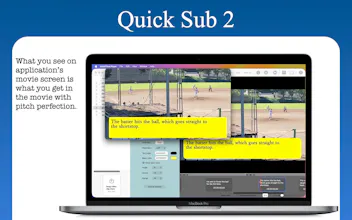
Traditional video editors make overlaying and styling individual subtitle callouts incredibly tedious. We've built Quick Sub 2 from the ground up using SwiftUI to fix that workflow. It gives you deep, independent creative control over text styling, container geometry, background colors, and rotation angles—without the bloat of a massive video editing suite.
Here is what makes Quick Sub 2 completely different:
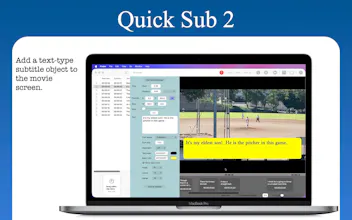
・ Direct Canvas Manipulation: Just drag your subtitle objects directly over the movie screen to position them.
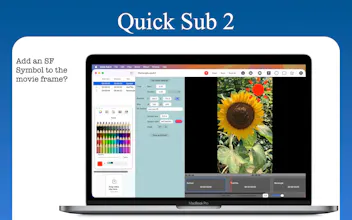
・ Advanced Styling: Rotate selected subtitle objects to get the perfect structural angle for your layout.
・ Workflow Efficiency: Apply size and style parameters across multiple subtitle objects with a single menu command.
・ Dynamic Timeline: Effortlessly drag objects to change timing, and zoom your timeline from 0.1x to 10x for precision editing.
・ Full Undo/Redo & Native Saving: Built with a robust native undo stack and custom .qsub2 project persistence.
We’d love to hear your thoughts, feedback, and feature requests. Thank you for the support!
++++++++++++++++++++++++++++++++++++++++++++++++++++++++++++++++++++++++++++++
We have sent Version 2.2.0 to the Mac App Store. This update will lets you export a subtitle file (.srt) to disk out of the text layers. Also, you will be able to use a saved application document as presets. Additionally, the Timeline layer that you move with your mouse pointer will snap to it if it's near the beginning of the frame.
Version 2.2.0 is out, folks. It may take Apple, Inc. several hours to propagate it, though.
The direct-canvas dragging plus batch styles across objects is the part that would actually save me time — positioning subtitles in a timeline-only editor is the tedious bit. Two workflow questions before I'd switch a video over: on export, does it burn the subtitles into the video, or can it also output a separate .srt/.ass sidecar so I can re-edit captions elsewhere? And does the .qsub2 file save styling as reusable presets I can reapply across a whole series, or does each new video start from scratch?
@leo404 When you click on the Set saved settings button, the settings will apply to any project you start with. Also, you can turn on the User saved settings checkbox button at the bottom to let the application use the saved settings whenever you create a new layer.
The application will only burn the subtitle into the video for the moment. Exporting the subtitle into an srt-formatted file sounds like an interesting feature for consideration.
@leo404 Okay. It's done. Installing the srt feature is a piece of cake. I've tested it with VLC Player. It works fine. I'm thinking about installing another feature that somebody else has mentioned. So please hang on for several days.
@leo404 I've submitted Version 2.2.0 to Mac App Store. This version allows you to read a save project file as presets. Quick Guide Ch. 4 briefly explains how it works.
the on-canvas drag-and-rotate is the good part — the quiet killer is preview-to-export parity. canvas previews at display res, the burn-in composites at source res, so rotated text anti-aliases differently and slips off the placement you set by hand
@qifengzheng
I'm afraid I don't see it. It seems that Quick Sub 2 does a good job positioning a rotated text layer on the resulting video as I test it.
@tomato4266 fair — if rotated text holds its placement through export, the burn-in path is doing its job. the case i had in mind was non-90° angles where preview and final sample edges differently, but sounds like you've got it covered.
@qifengzheng I see. I think so. But thanks for the warning, Mr. Zheng.
SwiftUI-native and the timeline precision at 0.1x is genuinely useful for tight caption sync. Batch styling across multiple objects worked exactly as advertised, though I wish the canvas allowed nudging with arrow keys for pixel-level tweaks.
@melekmisp
Thank you for your suggestion. I just released 2.2.0 some 10 hours ago. But let me see what I can do about it since I have been able to do the same for Firestorms 2, a graphic editing application.
@melekmisp Okay, Melek, it's been done. You will be able to move the selected layer with arrow keys. This feature will be available AFTER Version 2.2.0 is released. Thank you for your good suggestion.
@melekmisp Actually, I'll integrate the arrow key feature into Version 2.2.0.
Does the dynamic timeline let you snap to frames or audio cues, or is it strictly time-based scrubbing? Trying to gauge how it handles tight lip-sync adjustments.
@halilekinmn7y It does not snap to a frame at this moment. I may take a look in the near feature. But I can't do it at this time since I've already started working on a new project.
@halilekinmn7y With Version 2.2.0, the Timeline layer will snap to it if it's near the beginning of the frame. This update will be available in a few days.
Love that you can drag subtitle objects right on the canvas instead of fighting a properties panel. With that 0.1x to 10x timeline zoom, does the dragging snap to anything at the fine end, or is it pure freehand timing when you're lining up a fast cut?
@sezerufukyavuz It won't snap to any point for the time being. I took a look several days ago. I have no solution for that for now.
@sezerufukyavuz With Version 2.2.0, the Timeline layer will snap to it if it's near the beginning of the frame. This update will be available in a few days.
@thys_beesman I see. Subtitle layers are indeed a bit too slow to move. I'll take a look to see what I can do about it in a week or two. I can't do it now since I've started working on a new project.