
Retouch4me is a suite of professional AI tools for photo and video retouching, including standalone apps, plugins, and neural network–based tools that automate up to 80% of routine work without compromising quality or creative control.
This is the 7th launch from Retouch4me. View more
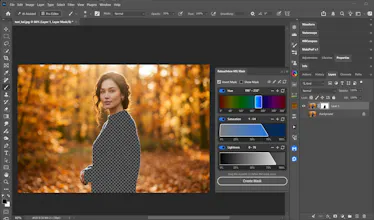
Photoshop HSL Masking Panel
Launching today
HSL Masking Panel gives you precise control over color selections without the hassle of harsh edges and messy masks. Easily isolate specific ranges of Hue, Saturation, and Lightness, and use smooth falloffs for natural transitions.
Free
Launch Team

WannlabsPrivate AI + Docs, Drive, Automation and more. Encrypted everything. Not even we can see
Promoted


Hi Product Hunt! I’m happy to share a free tool that makes color-based masking in Photoshop much easier.
When you need to adjust a specific color without affecting the rest of the image, creating a clean mask can take time. HSL Masking Panel lets you select colors by hue, saturation, and lightness, fine-tune the ranges, and create smooth transitions for more precise edits.
We’d love to hear how you use color masks in your workflow. What’s the trickiest part of making a clean selection?