
SecAIQ Watch
What are your AI tools really doing on your machine?
51 followers
What are your AI tools really doing on your machine?
51 followers
Free, open-source dashboard that shows which AI tools run on your computer, what they connect to, what they can access and how many tokens they use. Local and read-only: no cloud, no account. macOS, Linux, Windows (beta).




Hi Product Hunt 👋 I'm Safa, the maker of SecAIQ Watch.
AI assistants now read our project files, run commands and connect to MCP servers, yet most of us can't say what they are connected to or allowed to touch. I built SecAIQ Watch to make that visible on my own machine.
What it does:
• Detects ~37 AI tools and ~33 providers (coding agents, chat apps, AI editors, local models, MCP servers)
• Shows live connections and bytes sent/received per tool
• Maps each tool to sensitive areas: SSH keys, .env files, cloud credentials, browser data, keychain
• Flags risky settings and gives a posture grade from A to F
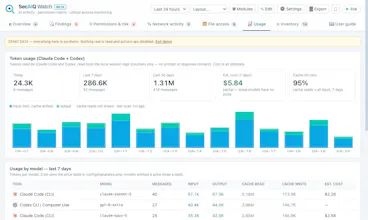
• Tracks token usage for Claude Code and Codex
• Exports reports and an AI-BOM (CycloneDX 1.5)
How it stays safe: it is local and read-only, it never sees prompts or file contents, the panel only answers on 127.0.0.1, and it loads no third-party code.
It's a beta and I want to be upfront about that. It works well on macOS. Linux and Windows have only been tested against sample command output so far, and Windows can't report per-connection byte counts at all. That is exactly where your feedback helps most: run `php bin/diagnostics.php` and open a GitHub issue if something looks off.
It is MIT-licensed and needs only PHP 8.1+ with SQLite (no Composer, no database server, no account). There is a built-in demo mode with synthetic data if you'd rather explore before pointing it at your own machine.
What would you want it to show that it doesn't yet?
Update: v0.12.0-beta is out 🎉
Thanks to everyone who tried SecAIQ Watch and gave honest feedback. A reviewer pointed out that the A–F grade could give more confidence than it should. That was fair, so this release focuses on that and on closing the loop on findings.
What's new
The grade now says what it covers. It only reflects the AI tools the app recognises. Reports and the dashboard now say so, show how many other processes are using the network and are not classified, and link straight to them. It's a score for the tools it knows, not a clean bill of health.
Conditional risk acceptance. Accept a finding for today, 30 days, or one project only. It reopens by itself if the evidence changes.
Monitoring health. Each data source shows whether it's current or couldn't be read, so a blind spot never looks like quiet.
MCP server trust. If an MCP server's command, package version or address changes after you trusted it, you get a finding with before/after.
Fix verification and a session timeline. See whether a Protect action actually took effect, and follow one work session's processes, destinations and sensitive file access on a single timeline.
Clearer platform status. The README, guide and in-app banners now state how each OS has been tested. macOS is the reference platform; Linux has been tested with sample command output only; Windows is in early real-machine testing.
SecAIQ Watch is still a visibility tool: it doesn't block anything. It's free, MIT-licensed, local-only, no account.
👉 github.com/Spaksu/secaiq-watch
If something looks wrong on your machine, run php bin/diagnostics.php and open an issue. Feedback like yours is what shaped this release.
Something I want to say openly: within hours of launching I got messages offering to buy votes, and others promising "real, engaged voters" for a fee.
I understand why the offers exist, the first hours matter, but I don't want this project's first supporters to be paid ones.
SecAIQ Watch is a security tool; trust is the whole point, and that starts with how I introduce it. If you've tried it, I'd rather hear one honest criticism than receive ten upvotes.
the part I'd want answered before trusting the posture grade: this detects ~37 tools by some kind of signature. what happens when a tool isn't in that list - does it just not show up, or does it flag "unknown process with network access" as its own category? a detector that goes quiet on unrecognized tools is more dangerous than no detector at all, because it replaces "I don't know what's happening" with a false "everything's fine" from a dashboard that looks authoritativ
@galdayan Fair challenge, and you were right: until now, a process that wasn't in the signature list only showed up if it talked to a known AI provider address; anything else was silently ignored, and the grade said nothing about coverage.
I've just changed both. There's now a "Not classified" view listing every other process with outbound connections (process, destinations, bytes), and the posture grade carries a coverage line, e.g. "based on 6 recognised tools; 14 unclassified processes are using the network". The grade is still a score for the tools it recognises, and it now says so. New signatures are one regex in config/signatures.php.
Release: https://github.com/Spaksu/secaiq-watch/releases/tag/v0.10.0-beta.
Demo: https://spaksu.github.io/secaiq-watch/demo/