Hey everyone,
I built ShotLab because I was tired of spending too much time making screenshots look good for blogs and product updates.
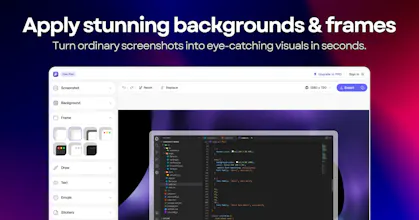
Just upload an image, and you instantly get a clean, professional-looking visual with a cool background, proper spacing, rounded corners, and more. You can customize further with frames, shadows, annotations, stickers, or emojis in an easy-to-use editor.




Hi PH! 👋
@vasudevsoni & @jai_mittal here, makers of ShotLab. Together with our early users, we've been working on a new exciting project for the last months. We're so stoked to share it with you today:
Meet ShotLab, the simplest way to spice up boring screenshots for free.
🙋🏻♀️ Why ShotLab?
As founders, & marketers we were frustrated with existing screenshot editors. Most tools are either too complicated, packed with features you'll never use, or locked behind expensive subscriptions. We wanted a fast, beautiful, and affordable way to turn ordinary screenshots into professional visuals. That's why we built ShotLab.
1. Works fast: Create stunning screenshots in seconds. Add beautiful backgrounds, gradients, frames, annotations, text, and effects with an intuitive editor designed for speed. Take it for a spin, no sign-up needed: shotlab.pro/editor
2. Built for creators & indie hackers: Whether you're sharing product updates, social media posts, bug reports, tutorials, or marketing assets, ShotLab helps you create polished visuals that stand out and get noticed.
3. ShotLab Pro: Simple pricing. ShotLab pro enables you to remove the watermark from exported images, at $1.99/month. We also offer a lifetime free plan.
🤩 Powerful features for FREE
Unlimited screenshot exports, custom backgrounds, stunning gradients, cool stickers & emojis, annotations with multiple text options, pre-sized canvases for multiple platforms including ProductHunt, Dribbble, X, Reddit & more, Export formats including JPEG, PNG and WebP, Instant Previews, Unlimited Step-back, and many more.
🚀 What’s next?
Animated stickers, GIF exports, dark mode, mobile editor, and more! Take a look at our public roadmap (shotlab.featurebase.app/roadmap) to see what features will be shipping soon.
🤑 Today's discount: 40% off ShotLab Pro
To celebrate our PH launch we're offering 40% off ShotLab Pro for 1 month. Use MONTHLY40 at checkout, only redeemable by first the 50 users.
💜 Let us know what you think!
ShotLab is made from the heart and we couldn’t be more excited for you to check out our work. We would love to hear from you and get your thoughts on how to take our product to the next level. Feel free to leave a comment below, join us on X (x.com/shotlab_pro), or reach out via email (hello@shotlab.pro), anytime.
Vasudev & Jai
Wow, this is impressive — so many ways to decorate screenshots! But I'm so curious about the use case. Personally I usually use screenshots either to circle or point at something specific, or just send them as-is and ask Claude about it. Who is your main user?
@vasudevsoni Ah, got it, so decorated screenshot is aiming to show the product in a more engaging way or explain how to use product better?
Hello Inbox
I was recently looking for a tool like this. Perfect timing. Congrats on the launch!
Will you have an option for a yearly plan after the LFD is over?
Love how clean the editor feels, no clutter getting in the way of actually styling the screenshot. The frame options look genuinely polished too, way beyond the usual rough borders you see in tools like this.
The annotation tools feel really thoughtfully designed—it's clear the team actually used them on real screenshots while building this, which is rare.