
ShroomPen
Reply, rewrite, fix grammar, translate with single extension
62 followers
Reply, rewrite, fix grammar, translate with single extension
62 followers
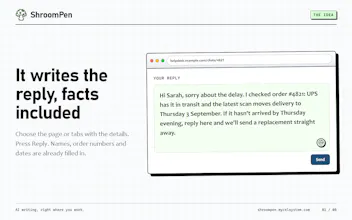
ShroomPen is a privacy-first browser writing assistant that lets you instantly reply, rewrite, fix grammar, or translate text across any website without sending sensitive data to the cloud. Designed to balance AI convenience with absolute data privacy, it keeps all your page, field, tab, and session context securely on your device, giving you complete control over your everyday web workflow.





Like many developers, I found myself constantly frustrated by the privacy trade-offs of modern AI writing tools. Every time I wanted a quick rewrite, grammar fix, or translation in the browser, I had to send sensitive webpage content, form data, and personal context to third-party cloud servers.
I built ShroomPen to solve that exact problem: bringing the seamless convenience of an AI writing assistant directly to the browser while keeping 100% of the data local and private on the user's device.
As I worked on the launch, my approach evolved from trying to build a heavy, feature-bloated extension to focusing tightly on a lightweight, context-aware utility. I realized that users don't want another complex app dashboard - they just want instant, secure help right inside the text fields they're already using, without ever having to worry about where their data is going.
I’d pick ShroomPen in three situations:
• You’re replying to something and need context from other tabs, a PDF, or your notes.
• You keep using the same background info for applications, outreach, or customer replies. Saved sources save you the copy-paste.
• You want to use your own AI provider or a local model and choose what context gets sent.
For everyday grammar checks as you type, I’d still expect Grammarly or LanguageTool to be better today. They’re also strong choices for detailed proofreading and consistent writing style.
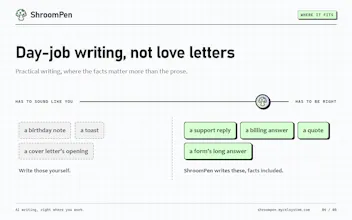
ShroomPen’s main advantage is letting you bring your context and your preferred model into the place where you’re already writing.
What feature would you most like to see next in ShroomPen?
“Sound like me” mode — save a few writing samples locally and explicitly choose when to include them.
Saved writing recipes — shortcuts like “make this less corporate,” “tighten this paragraph,” or “turn these notes into an email.”
Quick variations — generate three versions: concise, warm, and direct.
Or post your own idea!
"privacy-first" and "browser extension that rewrites text on any site" don't usually go together, most of these ship your selection to an API somewhere. is the model actually running locally in the extension, or is "privacy-first" here meaning no logging/retention on your servers rather than no network call at all? that distinction matters a lot for anyone pasting client emails into the rewrite box.
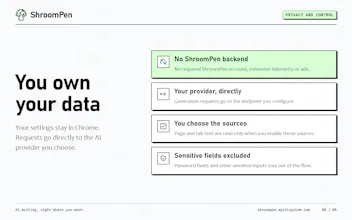
Fair question. The model doesn't run in the extension. What privacy-first means here is that there are no ShroomPen servers anywhere in the path.
It's BYOK. You add your own OpenRouter, OpenAI, or Gemini key, or any OpenAI-compatible endpoint, and the request goes straight from your browser to that provider. We don't run a backend, proxy, account system, or telemetry, so your text never passes through anything of ours. Once it reaches the provider, their retention and training policy applies, and ShroomPen can't change that.
If the text can't leave your machine, point the OpenAI-compatible option at Ollama, LM Studio, or llama.cpp on localhost. That setup is fully local, with no key needed and no network call beyond loopback.
Only what you pick gets sent: the selection, and page or tab context only if you add it. Password and sensitive-looking fields are skipped. Nothing from the page is stored, and your recent conversations clear when the browser session ends.
For client emails, we'd recommend a local model, or a provider you already have a DPA or zero-retention agreement with.
@ivan_bolvax that covers basically every case I'd worry about, the localhost fallback especially. we do something similar on our end for a voice product, local model for anything touching a live call transcript, cloud key only once it's already redacted. one thing I'd still ask: have you benchmarked local llama.cpp models against something like gpt-4o-mini for rewrite quality? that gap is usually where people quietly go back to a cloud key even after saying they cared about privacy.
@galdayan That's a fair point. We haven't done rigorous, formal benchmarking of local weights against 4o-mini yet. For general rewrites and tone tweaks, a good 8B local model (like Llama 3 8B via llama.cpp) holds up surprisingly well in everyday use, but you're right that subtle nuance and edge-case polish still lean toward cloud models. The local option is meant as a fallback for people who refuse to send certain data over the wire at all, rather than a claim that local open weights match GPT-4o-mini on every single task.
@ivan_bolvax fair, and honestly a good answer, most people would've just claimed parity. we ended up at the same fallback framing on our side, so this tracks