Privacy-first voice recorder for Mac and iPhone. Transcripts and AI summaries run on-device via Apple Speech and FoundationModels — no server, no account, nothing leaving your machine. Every recording exports as a Markdown file with YAML frontmatter — yours, on disk, ready for Obsidian or git. A built-in local MCP server lets Claude Code and other AI tools query the archive. Designed experience-first, to keep you in the moment. $7.99, buy once — Mac and iPhone, no subscription.
No reviews yetBe the first to leave a review for Signal Recorder SR-7
Hunter
📌
Hey Product Hunt — SR-7 is a voice recorder that keeps everything on your machine. Transcription, AI titles, summaries — all on-device, via Apple Speech and FoundationModels. No cloud, no account, nothing leaving the device.
That mattered to us because most voice tools either ship your audio somewhere (Otter, Granola) or trap the transcript inside their own app. Neither fits a workflow where your AI is already editing the same files you are.
SR-7 does three things:
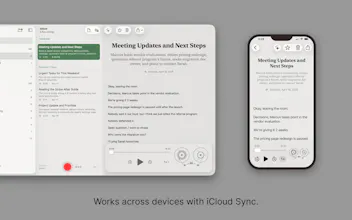
- Records on Mac and iPhone. Transcription runs on-device via Apple Speech — no network, no account.
- Writes an AI title and summary locally (Apple FoundationModels, macOS 26+).
- Exports each recording as a Markdown file with YAML frontmatter. Yours, on disk. Drop it in Obsidian, commit it to git, or let Claude Code reach it through the local MCP server — point your agent at the archive and ask "what did I decide about X last week?" It answers from your own recordings, without anything leaving the machine.
$7.99, one time. Universal purchase, Mac and iPhone. No subscription — we make money when you buy it, not by mining what you record.
Privacy and ownership, in an experience that's calm enough to keep you in the moment.
One thing we're genuinely curious about: what's in your voice-to-text pipeline right now, and what's broken about it?
Report
the local mcp server querying the archive is the part that caught me — that's the bit most on-device recorders skip. when claude code queries a big archive, does it pull full transcripts or just summaries? curious how you keep it in a sane token budget.
Report
Hunter
@qifengzheng the MCP has a decent set of tools to help with that. An agent can:
Run searches
Understand the project structure
Get an overview of a folder
Access and edit one more recording/transcript
...
So it can work fairly efficiently. But in most cases, the markdown files on disk are the most performant. Claude Code, for example, can directly access them and use its own tools and patterns to manipulate them on a system level.
I have a journal folder, and once a week, I process the various daily entries into a weekly summary with Claude. It even puts them back into SR-7 in a dedicated project for the weekly entries.
Some of the tools:
Report
Beautiful app. A suggestion would be to allow changing the transcription language on the fly (and maybe re-transcribe a note with new language settings) — even better, detect language automatically.
Report
Hunter
@fil2 thank you, Phil! Retranscribing individual recordings with manual language selection is an excellent idea for multi-lingual users.
Report
Buy-once + fully on-device exporting to Markdown with YAML frontmatter is a clean combo, and the local MCP server so Claude Code can query the archive is the part I didn't know I wanted. As someone building a Mac/iOS app, how does the on-device Apple Speech transcription hold up on longer recordings vs cloud models?




Hey Product Hunt — SR-7 is a voice recorder that keeps everything on your machine. Transcription, AI titles, summaries — all on-device, via Apple Speech and FoundationModels. No cloud, no account, nothing leaving the device.
That mattered to us because most voice tools either ship your audio somewhere (Otter, Granola) or trap the transcript inside their own app. Neither fits a workflow where your AI is already editing the same files you are.
SR-7 does three things:
- Records on Mac and iPhone. Transcription runs on-device via Apple Speech — no network, no account.
- Writes an AI title and summary locally (Apple FoundationModels, macOS 26+).
- Exports each recording as a Markdown file with YAML frontmatter. Yours, on disk. Drop it in Obsidian, commit it to git, or let Claude Code reach it through the local MCP server — point your agent at the archive and ask "what did I decide about X last week?" It answers from your own recordings, without anything leaving the machine.
$7.99, one time. Universal purchase, Mac and iPhone. No subscription — we make money when you buy it, not by mining what you record.
Privacy and ownership, in an experience that's calm enough to keep you in the moment.
One thing we're genuinely curious about: what's in your voice-to-text pipeline right now, and what's broken about it?
the local mcp server querying the archive is the part that caught me — that's the bit most on-device recorders skip. when claude code queries a big archive, does it pull full transcripts or just summaries? curious how you keep it in a sane token budget.
@qifengzheng the MCP has a decent set of tools to help with that. An agent can:
Run searches
Understand the project structure
Get an overview of a folder
Access and edit one more recording/transcript
...
So it can work fairly efficiently. But in most cases, the markdown files on disk are the most performant. Claude Code, for example, can directly access them and use its own tools and patterns to manipulate them on a system level.
I have a journal folder, and once a week, I process the various daily entries into a weekly summary with Claude. It even puts them back into SR-7 in a dedicated project for the weekly entries.
Some of the tools:
Beautiful app. A suggestion would be to allow changing the transcription language on the fly (and maybe re-transcribe a note with new language settings) — even better, detect language automatically.
@fil2 thank you, Phil! Retranscribing individual recordings with manual language selection is an excellent idea for multi-lingual users.
Buy-once + fully on-device exporting to Markdown with YAML frontmatter is a clean combo, and the local MCP server so Claude Code can query the archive is the part I didn't know I wanted. As someone building a Mac/iOS app, how does the on-device Apple Speech transcription hold up on longer recordings vs cloud models?