Launched this week

Smart Jelly
Your everyday AI tools and memory in one Mac app.
82 followers
Your everyday AI tools and memory in one Mac app.
82 followers
One app for dictation, live meeting help, Pre meeting notes, Notetaker, Track open loops and agents, all sharing one memory of you. No need to pay for five AI tools that each start from zero. Every feature knows your work and gets smarter as you use it.


Free Options
Launch Team / Built With


AWS Activate CreditsCredits that fuel your startup’s next milestone
Promoted
Hey everyone, I’m Nishant, founder of Smart Jelly.
I was paying for separate AI apps for dictation, meeting notes, live meeting help and agents. None of them talked to each other, so each one started from zero. I kept copying notes from one app into another just to give the AI enough context. I was paying for all of them and still doing the work of connecting them to Claude to use it as second brain.
So I built Smart Jelly: one app for all your work, with one shared memory.
Everything in one place:
Dictation that knows your context
Live meeting help: suggested answers, recall of past context, and fact checks against your past work
Meeting notes, with no bot joining your call
To-dos and commitment tracking
Agents that act on what Smart Jelly already knows
Every feature draws from the same memory, so a dictated email can pull from yesterday’s meeting, and agents can act on to-dos it already knows about. No more copying context between apps, and no more paying for five subscriptions.
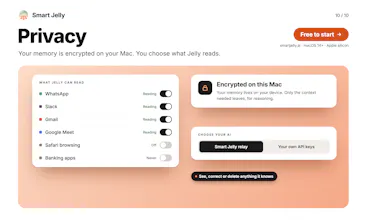
That memory is the hardest part to get right. We spent 6 months on it, and it scores 87.6% on the BEAM-100K memory benchmark. It stays encrypted on your Mac, and you can see, correct or delete anything it remembers.
Smart Jelly is free to start. I’d love to hear which AI apps you’d replace with it, and what’s still missing for you.
Shared memory across tools is a good idea. I lose a lot of time re-explaining things to different AI apps. One question from a security point of view: if the notetaker doesn’t join the call as a bot, how do the other people on the call know they’re being recorded? In the UK, and in some US states, you need their consent, and it’s normally the first thing a security or legal team will ask before letting a tool like this in. Can it announce itself, or keep a transcript without storing the audio?
@ian_sharpe Smart Jelly doesn't join as a bot, so it doesn't announce itself to the call today. Consent stays with the person running it:
Note-taking only runs if you switch it on, and your Mac shows when it's listening.
It keeps a transcript, not a recording. The audio is turned into text while the call happens and isn't saved.
Transcripts and notes live on your Mac. Our speech-to-text provider is set not to use your audio for training.
Where one-party consent isn't enough (the UK, and US all-party states like California), the right move today is to say at the start that you're taking notes, or to leave it off for that call. A one-click way to tell everyone on the call (a short line posted in the meeting chat) is something we're looking at, and your comment pushes it up the list.
Can you keep workspaces separate for different clients? Shared context sounds useful, but I'd want to choose where those boundaries are.
@yuliia_savchuk yeah your context is never shared to anyone. Also all your memory is stored locally on Mac
@magda_ochman not yet but soon
Would love to learn more about integrations with GTM tools. Any page?
@vijayanandkailash you can use Agents to automate GTM & set routines. Even your agents can do what your GTM tools are doing.
@nishant_chinchole Would love to discuss the use case.
@vijayanandkailash Happy to give you a 7 day free trial which includes agents. Try creating agents for 1. Competitor research
2. Linkedin/X Outreach
3. Reddit Research
4. Meta Research
5. Find leads through different channels with proper relevancy
6. Even you can schedule your posts with Jelly with routines
Copying notes between AI tools just to explain the same context again is a very familiar problem. The shared memory is what interests me most here. Congrats, Nishant!
@marianna_tymchuk thanks Marianna, glad u liked it
The shared memory being encrypted on the Mac, with anything remembered visible, correctable, or deletable, is the part I keep coming back to. If dictation can pull from yesterday's meeting and live meeting help can fact-check against past work, how do you keep a wrong or outdated memory from spreading across all of those tools before I notice and correct it?