
SpeakON
A MagSafe AI device for a post-keyboard world
1.1K followers
A MagSafe AI device for a post-keyboard world
1.1K followers
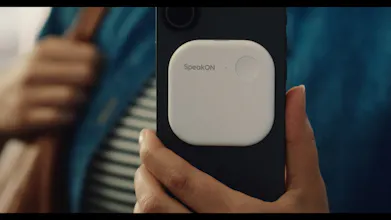
Typing is the bottleneck. SpeakON removes it. A MagSafe AI device for iPhone — press once to speak into any app. No mic permission. No switching. Even works with your phone locked. Zero friction.







SpeakON
@rockzhang For someone juggling workshop notes, how does SpeakON handle longer captures; like a 2-min ramble on "Hunter outreach tactics" and pipe them cleanly into Notion or Google Docs without losing the flow?
SpeakON
@dayal_punjabi Most conversations aren’t long monologues — they’re short bursts.
In real life, people typically speak in turns that last just a few seconds to under a minute.
That’s exactly what we designed SpeakON for.
We intentionally focus on short, high-frequency expression moments — quick replies, decisions, thoughts on the go — instead of long recordings.
That said, SpeakON still supports up to 5 minutes of continuous input, which comfortably covers:
a full voice message
a structured response
or even a short solo explanation
And because it works as an input method, you can use it seamlessly across any app — Slack, email, iMessage, anywhere you type.
Stella AI
SpeakON
@prad_vv Haha — fair question 😄
This one I typed
I’m on my computer right now.
SpeakON really shines on mobile / on the go.
When I’m at my desk, keyboard is still fastest for long-form.
But the moment I’m away from the screen — walking, between meetings, in a cab — I switch to SpeakON almost entirely.
PicWish
@rockzhang how does it handle really noisy environments like a subway?
SpeakON
@rockzhang @mohsinproduct Hi Mohsin, Daniel here, Head of Product, we've actually implemented a specific optimization for subway environments. I’m happy to say it performs great most of the time—it's designed to focus solely on your voice.
@rockzhang Love it! Does it work with Apple Message as well?
SpeakON
@rockzhang @ryan_snyder2 Hi Ryan! Yes, it’s compatible with Apple Messages. Actually, it works in any app where you can use a keyboard. It's have a keyboard app also named "SpeakON" to work with the SpeakON hardware.
@rockzhang Was the security of the device's data also considered? Given that it works even in the background, which could be risky, where is the transcription information stored?
I'm quite interested in the platform, but I'd like to know about the security risks.
SpeakON
@mabel_urrego Hi Mabel. Absolutely. Privacy is our top priority. All data is encrypted during transfer and stored securely. Most importantly, we support full local storage on your phone—meaning we never store your data to the cloud. You have 100% ownership and control over your data.
Raycast
A keyboard, but your voice presses the keys. 🗣️⌨
Genius.
SpeakON
@chrismessina Thanks, Chris. Please feel free to share more of your feedback on the product moving forward.
Flowtica Scribe
This could definitely become a shortcut for triggering an agent. So cool!
Congrats on the launch, @rockzhang & team!
SpeakON
@zaczuo Love that angle — that’s exactly where we’re heading.
Right now it’s about removing friction from expression,
but the next step is turning that same action into intent → execution.
One press → not just input, but action.
Really appreciate the support 🙌
MagSafe-AI-button as a hardware shortcut into any iPhone app is an underrated primitive — shortcuts apps never crossed the friction threshold. Works-while-locked is the specific feature that turns it from "nice voice note app" to "don't lose the thought." Curious how SpeakON handles privacy review when it inserts text into apps that have never explicitly granted clipboard or accessibility permissions.
SpeakON
@borrellr_ Exactly! We’ve built a dedicated iOS keyboard app that acts as the bridge. The hardware transmits data directly to the app, which has full system access. This allows for a seamless, 'it just works' experience across any app you're using.
Oh heck yes! Does this mean that I don't have to go through the "switch keyboard, start the voice to text app, switch back to the app..." loop every time I want to speech to text? Does it work directly with Apple Message? Would love that!
SpeakON
@ryan_snyder2 Exactly, Ryan! That’s the core philosophy behind our hardware. We wanted to eliminate the friction of app-switching, prevent mic-hijacking, and ensure zero drain on your phone’s battery. It’s all about a seamless, dedicated experience.
SpeakON
@ryan_snyder2 Yes, you're absolutely right. The best part is that it doesn't just solve the initial friction of getting started.
When you're out for a walk or suddenly hit with a burst of inspiration right before bed, you can use this little device to quickly record your thoughts—all without ever having to unlock your phone.
So you just press it and start speaking to input text?
That’s interesting! it feels more like a physical keyboard replacement than a recording device.
Really like this direction. I’ve been looking for something that helps structure my thoughts while speaking.
SpeakON
@tom_j Exactly — you press and speak, and the text goes directly into whatever app you’re using.
That’s why we think of it much more as an input device than a recorder.
Recording tools capture after the fact.
SpeakON is about thinking while speaking, and getting structured output in real time.
We’ve put a lot of work into things like:
cleaning up filler words automatically
structuring thoughts (when needed)
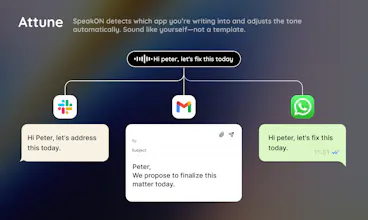
adapting tone depending on where you’re typing
So it doesn’t just transcribe — it helps you express clearly without breaking your flow.
Really glad that direction resonates 🙌
Stanley For 𝕏
This is a very interesting direction. What made you bet on MagSafe as the form factor here?
SpeakON
@iampascio Great question — we went through a lot of form factors before landing on MagSafe.
The core idea was: this has to be zero-friction, or it doesn’t work.
MagSafe ended up being the best fit for a few reasons:
1. Always there, always ready
If it lives on the back of your phone, it’s already in your hand 100 times a day.
No extra device to carry, no “where did I put it?” moment.
2. One natural gesture
Your index finger is already resting near the back.
Press → speak becomes a very instinctive motion — almost like a reflex.
3. No setup, no attachment friction
MagSafe gives us:
instant snap-on / snap-off
no pairing rituals every time
no cables, no mounts
It just becomes part of your phone.
4. Stable position = better capture
Because it’s fixed in one place, we can tune the mic behavior and interaction much more reliably than a loose device.