
Toku Reader
Read & listen to native Japanese and Chinese, tap any word
109 followers
Read & listen to native Japanese and Chinese, tap any word
109 followers
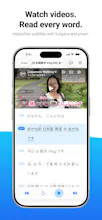
Toku turns native Japanese and Chinese — articles, novels, podcasts, and YouTube videos — into something you can actually read. Tap any word for its reading, meaning, and dictionary, without leaving the page. On audio and video you get a synced, word-tappable transcript: tap to learn, slow it down, replay a line, or pause after each sentence to shadow it back. It runs its own JP/CN engine on-device with offline dictionaries — fast, private, no accounts, no streaks. Just reading.




@darren_nah Hi Darren,
I absolutely enjoyed your product, being an active language learner (Korean - level 5, and currently learning Norwegian and Finnish) I liked how it's got podcast that one can practice, that's my personal favourite!! Japanese and Chinese have been on my lang list especially after my trip to Taiwan, now I'm gonna level in Chinese yay!
Congratulations on the awesome product!!
@vb_30 Thank you for trying the product! I've recently updated the podcast feature to be even easier to use and I hope it will be of much use as you begin Chinese! Please feel free to leave a review on the app store for my app after you've had a chance to explore its features, it really helps indie developers like me! Thank you once again!
The on-device offline dictionary part is what stands out to me, most language tools want you online for lookups. On the Chinese side specifically, word segmentation is the hard part since there are no spaces to tell you where one word ends and the next begins, and it's easy to tap-split a compound wrong. Also curious whether it handles both simplified and traditional, since a lot of Chinese content someone might paste in (Taiwan sites, older text) is traditional even if the learner studied simplified.
@galdayan Hello Gal, thank you for the comment. To answer your question, yes, the app supports both simplified and traditional Chinese. The segmentation of languages like Chinese is indeed very difficult given the lack of spaces, polyphones and multiple readings of same characters. While no deterministic, fully offline parser can get it 100% accurate, my app has built in redundancies, e.g., offering alternative ways to parse characters to allow the reader to get at the meaning faster through context clues (see screenshot). Hope this helps!
@darren_nah That alternative-parsing screenshot is a smart fallback, letting the user pick the right grouping is way better than silently guessing wrong. Good luck with the launch, this is exactly the kind of tool that turns off-and-on reading into actual immersion.
how does it handle the furigana lookup for kanji compounds that have multiple readings depending on context, like 当て字 or rare names?
@cafer441121 Hello Cafer! Thanks for the comment! While my app has an offline engine that parses the context for kanji with multiple meanings and offers the most likely reading in a context, I admit that a fully offline engine will not be 100% accurate. To account for this, in the pop-up, I also allows the reader to see variants of the reading (see screenshot), and they can see if other readings make more sense given the context.
the synced word-tappable transcript for podcasts and youtube is the part i'd want to stress test before trusting it. japanese in particular has a ton of homophones and casual speech drops particles constantly, so an on-device engine transcribing real conversational audio (not clean narration) seems like the hard part. does it show any confidence signal when it's guessing on a mumbled or fast line, or does it just silently give you its best guess as if it were certain
the "tap any word on a youtube video or podcast" part is the bit that matters. most immersion apps make you leave the content to look something up, which kills the flow and the motivation right when you had it. keeping the lookup in place on real native material (novels, podcasts, video) is how people actually stick with a language instead of grinding flashcards. congrats on the launch.
@alex_watson2110 Thank you Alex! Yes, that's the motivation, and I want to create something that truly helps people understand "in flow". I will keep working on this app, and truly try to make this something that helps Japanese and Chinese learners!
How does the on-device engine handle really obscure kanji or rare compound words that might not be in the bundled offline dictionaries — does it just leave you stuck on those?
As a Chinese speaker who also ships an iOS app, the "no accounts, no streaks, runs on-device" stance is the part I respect most — most language apps throw up a login wall and a streak counter before you can read a single sentence. Curious from the build side: bundling full JP + CN engines and offline dictionaries usually means a chunky download and some battery cost. Roughly how big is the app, and does the parsing stay snappy on older phones?