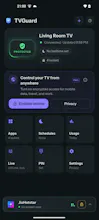
Parental controls barely exist on Android TV — and those that do want an account that uploads your kid's viewing history. TVGuard is local-first. The phone talks straight to the TV over your Wi-Fi: no account, no signup, usage data never leaves your network. Remote access is optional, encrypted, and off by default. Install the TV agent, pair from your phone, then set per-app PIN locks, daily limits and bedtime hours. It also PIN-protects the TV's own Settings so it can't be undone.
Hi PH 👋
I built this because I couldn't find a way to limit screen time on our
Android TV. Everything was either a phone-only app, buried in some TV
maker's launcher, or a cloud service that wanted an account and my kid's
full viewing history.
TVGuard is two apps: an agent on the TV, and a controller on your phone.
They talk directly over your local Wi-Fi. There's no account, no signup,
and the TV's app list and usage data never leave your network. There is an
optional encrypted relay for changing rules while you're out, but it's off
by default and everything works without it.
What it does: per-app PIN locks, daily time limits, bedtime hours, per-app
usage, and PIN protection on the TV's own Settings so a determined kid
can't just undo it. There's also a scrambled PIN keypad, because mine
figured out the code by watching the remote.
Honest about the rough edges: you have to install the TV agent yourself,
and it needs Accessibility permission to see which app is in the
foreground — that's how enforcement works. It's early and I'm shipping
fixes weekly.
I'd really like feedback on the pairing flow. It's the part I know trips
people up most, and I'm actively rewriting it.
Happy to answer anything about the local-first architecture.