VPN Peek monitors your VPN status from the macOS menu bar and detects DNS & IPv6 leaks. Get instant notifications when your VPN drops or your traffic leaks. Works with any VPN provider. Free to use, with an optional one-time Pro unlock.
VPN Peek 3.0 is a near-total rewrite. Most VPN leak tests slap a green checkmark on you, but if you run WARP, NextDNS or any loopback resolver, that check is meaningless. 3.0 adds a third state, "Not Fully Verified", telling you when it genuinely can't confirm you're safe instead of guessing. It asks the kernel which interface your DNS actually leaves through, keeps leak history with timestamps, and still works with the wifi off. Native SwiftUI, no tracking.
Hi PH 👋 I first launched VPN Peek back in January. Since then I rewrote basically the whole engine, so I'm relaunching as 3.0.
The one idea behind this version: most VPN checkers lie to you. They compare your DNS against a list and slap a green "protected" on it. But if you run WARP, NextDNS, dnscrypt or AdGuard (a loopback resolver), that check is meaningless, and a green checkmark there is a false promise.
3.0 does three things differently:
- It has a THIRD state, "Not Fully Verified." When it can't prove you're safe, it says so instead of guessing.
- It asks the kernel which interface your DNS actually leaves through (a route probe), instead of eyeballing IP addresses.
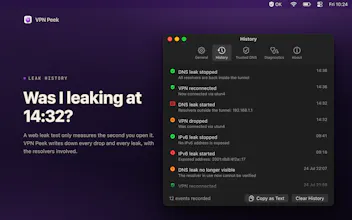
- Leak history with timestamps, so "was I leaking at 14:32?" is answerable.
A few things people asked last time, answered up front:
- Continuous, not manual. It watches in the background and notifies the moment you leak.
- No kill switch: the App Store sandbox can't block traffic, so I don't pretend to. This is a monitor, not an interceptor, and it's honest about that line.
- Detection is fully transparent: it's a route probe, not a guess from the IP.
Still a one-time unlock, still native SwiftUI, still works with the wifi off. Happy to answer anything about how leak detection actually works on macOS.




VPN Peek