Launched this week

WhoIsCooking
See which AI agent is heating your Mac and cool it down.
140 followers
See which AI agent is heating your Mac and cool it down.
140 followers
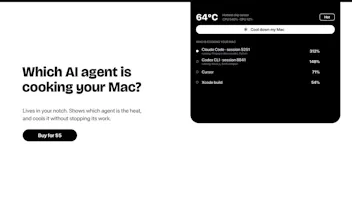
A Mac app that shows chip temperature and which AI agent (Claude Code, Codex, Cursor) is heating your Apple Silicon Mac. One click moves busy work to the efficiency cores, so everything keeps running, cooler. $5 one time.





Payment Required
Launch Team

CloudflareDeploy serverless functions globally in seconds
Promoted
Hi Product Hunt, I'm Andrew, the maker.
I run Claude Code and Codex on a MacBook and it kept getting hot, with no way to tell which agent was responsible. Activity Monitor shows dozens of node and compiler processes and no temperature at all.
WhoIsCooking shows the chip temperature in your notch or menu bar, groups each agent session with everything it started into one row, and has a "Cool down my Mac" button that moves busy work to the efficiency cores. Nothing is killed or frozen. On my M5, 4 processes flat out went from about 83°C at full speed to about 48°C cooled. The work just runs a bit slower.
Honest limits: it can't cool GPU work or Apple's own processes, and it needs Apple Silicon (M1 to M5) on macOS 14+.
It's $5 one time, signed and notarized, no account. I'd love feedback on what else it should show per agent.
You asked, I built it. WhoIsCooking 1.9 is out 🎉
Ida and Keesan asked for heat history and a timeline per agent session, so that's what I spent today on:
• A Today tab with your chip temperature through the day. The hottest moments are labelled with the agent behind them.
• "Who heated your Mac today": each agent's share of the work, plus how many hot minutes it caused.
• A timeline for every agent session, coloured by what it was doing (building, testing, checking, dev server). A thin line means it's open but idle.
• Each row says what the agent is doing and for how long, like "building 12 min", so a long compile doesn't look like a runaway loop.
• The app now tells you when a new version is out, so updates reach you without checking the site.
The screenshot is my own Mac today. If you already bought it, the new version is in your download link (sign in with the email you paid with). Thanks for all the feedback, keep it coming.
This makes me happy. I was literally thinking about this yesterday as the fans were blasting on my Macbook.
One row per agent, with its builds, tests and dev servers grouped under it, beats staring at 80 processes.
@simon_moxon im glad you are happy for something I made, and yes the worry of my Mac getting destroyed is the thought which lead me to build this and im very happy now I dont need to worry about my Mac getting hot
I wonder if you can check the temperature history and see which agent puts the most strain on your Mac throughout the day?
@idahansen Good idea, and it's not in the app yet. Right now it shows the live temperature and who's hot at that moment. A daily history ("Claude Code was behind most of the heat today") is near the top of my list now. Would you want that as a simple chart or as a ranked list per agent?
@idahansen Update: I built both. WhoIsCooking 1.9 has a Today tab with a temperature chart for the day, where the hottest moments are labelled with the agent behind them, plus a "Who heated your Mac today" list that ranks each agent by its share of the work and its hot minutes. Thanks for the idea, it was the first thing I built after launch.
Congrats on WhoIsCooking. Cooling a build instead of killing it is the trade I'd take, I'd rather wait than lose the work.
Grouping everything under one row per agent is the part that makes this usable. Activity Monitor showing dozens of node and compiler processes tells you the Mac is hot, but it never answers which agent session is responsible, or which of its builds, tests, and dev servers belong together. Moving busy work to the efficiency cores instead of killing or freezing it also seems like the right trade-off: the work keeps running, just slower, which is what you want when a long agent run is in progress. Stating the limits up front — no cooling for GPU work or Apple's own processes, and Apple Silicon only — makes the $5 one-time scope much clearer.
@jcbuilds Thanks JC, you got exactly why I built it. I didn't want to kill anything mid-run, because losing 20 minutes of agent work is worse than a hot laptop. The efficiency cores keep it going, just slower. And I'd rather list the limits up front than have someone pay $5 and find out their GPU-heavy work doesn't cool.
How does it tell which agent is using the CPU when several are running at once???