Workflo sets up your Mac automatically — staging the right windows before a call or a focus block, and restoring your layout when displays change. Runs on Accessibility alone: it structurally cannot read your screen. Native Swift, ~4 MB, one-time purchase, local-only.
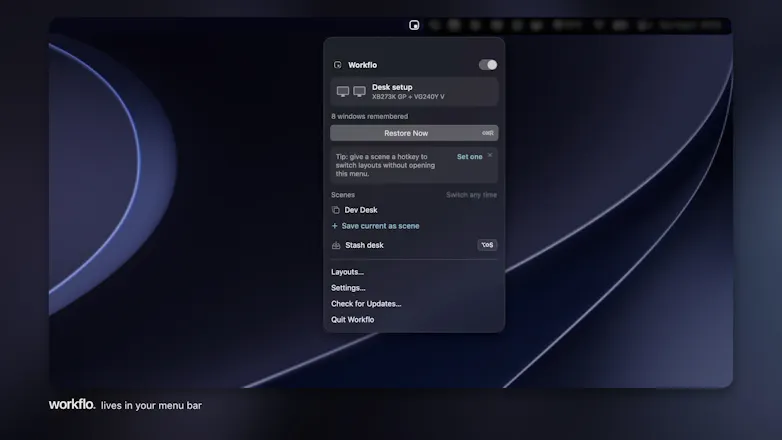
Workflo is my answer to a small tax I paid every day: rebuilding my Mac workspace from scratch at every context switch. A call, a focus block, docking at my desk, each one meant another minute lost to reopen, drag, resize, and hide windows and my workspace.
Every tool I tried made that minute faster, but they all wait to be asked. Workflo removes the asking. It learns your layout for each display setup (Desks), stages the right windows before calendar events or at set times (Scenes), and snaps everything back when displays change. One hotkey clears the screen for a share and restores it after (Stash).
One design constraint I held onto: it runs on the Accessibility permission alone. It never asks for Screen Recording, so it structurally cannot see what's in your windows; the preview-style tools need that permission; Workflo doesn't. We do not collect, record, or transmit any data from your device. Everything stays local.
($19.99 one-time, 7-day free trial, no account, ~4 MB of native Swift. 20% OFF to celebrate the launch this week. I'm also giving away 5 free licenses today; at the end of the day, I'll send them to the people whose feedback shaped the roadmap most.)
I'll be here all day - please tell me which context switch annoys you most, and what per-app rules you'd love to see.
Report
@ch1rag I’m curious how Workflo handles apps that aren’t open yet when a Scene is triggered?
Report
💡 Bright idea
The more trigger types, the better.
Moom is the reference today on macOS for this type of automation and the ability to trigger a specific arrangement of windows & apps via keyboard shortcut is key (pun intended).
For me, time and calendar events are interesting triggers but they cover only a small fraction of the reason I want a specific scene as you call them.
Most of my context switches are driven by something else, a specific project or client, and today, a combination of macOS native Spaces, a Stream Deck and Moom covers most of my needs very well, because I can trigger a specific arrangement via a specific keyboard shortcut.
Another type of trigger that would be helpful for me is when I switch to a specific Space.
Which other triggers have you considered for the roadmap?
@damien_schreurs Thanks, Damien; really appreciate the thoughtful note and the use case. Scenes do have per-Scene keyboard shortcuts, so your Stream Deck flow works with Workflo today: just assign the combo to a key, and it fires the Scene. And agreed, Moom + Spaces + Stream Deck is a strong setup. Calendar and clock triggers do not replace that; they cover the step before you reach for the shortcut.
On the Space trigger: macOS does publicly announce that the active Space changed, but not which Space you landed on. So "on any Space switch" is doable, while "on Space 3 specifically" takes a bit more care. Good idea though, noted!
Also on the roadmap: Focus mode triggers and Shortcuts actions. That is the fun part: once applying a Scene becomes a Shortcuts action, anything that can run a shortcut can become a trigger, including your Stream Deck, and Shortcuts Automations like Focus, Wi‑Fi, or opening a specific app can chain straight into it.
A project or client switch like yours is exactly the kind of trigger pattern I wanted to learn about, so thanks again for sharing it.
Workflo
Hi Product Hunt, Chirag here! 👋
Workflo is my answer to a small tax I paid every day: rebuilding my Mac workspace from scratch at every context switch. A call, a focus block, docking at my desk, each one meant another minute lost to reopen, drag, resize, and hide windows and my workspace.
Every tool I tried made that minute faster, but they all wait to be asked. Workflo removes the asking. It learns your layout for each display setup (Desks), stages the right windows before calendar events or at set times (Scenes), and snaps everything back when displays change. One hotkey clears the screen for a share and restores it after (Stash).
One design constraint I held onto: it runs on the Accessibility permission alone. It never asks for Screen Recording, so it structurally cannot see what's in your windows; the preview-style tools need that permission; Workflo doesn't. We do not collect, record, or transmit any data from your device. Everything stays local.
($19.99 one-time, 7-day free trial, no account, ~4 MB of native Swift. 20% OFF to celebrate the launch this week. I'm also giving away 5 free licenses today; at the end of the day, I'll send them to the people whose feedback shaped the roadmap most.)
I'll be here all day - please tell me which context switch annoys you most, and what per-app rules you'd love to see.
@ch1rag I’m curious how Workflo handles apps that aren’t open yet when a Scene is triggered?
Workflo
@damien_schreurs Thanks, Damien; really appreciate the thoughtful note and the use case. Scenes do have per-Scene keyboard shortcuts, so your Stream Deck flow works with Workflo today: just assign the combo to a key, and it fires the Scene. And agreed, Moom + Spaces + Stream Deck is a strong setup. Calendar and clock triggers do not replace that; they cover the step before you reach for the shortcut.
On the Space trigger: macOS does publicly announce that the active Space changed, but not which Space you landed on. So "on any Space switch" is doable, while "on Space 3 specifically" takes a bit more care. Good idea though, noted!
Also on the roadmap: Focus mode triggers and Shortcuts actions. That is the fun part: once applying a Scene becomes a Shortcuts action, anything that can run a shortcut can become a trigger, including your Stream Deck, and Shortcuts Automations like Focus, Wi‑Fi, or opening a specific app can chain straight into it.
A project or client switch like yours is exactly the kind of trigger pattern I wanted to learn about, so thanks again for sharing it.