Launched this week

xtty
A terminal that makes everyday work easier.
83 followers
A terminal that makes everyday work easier.
83 followers
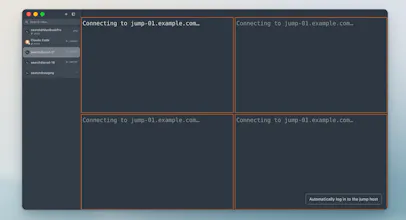
Spend your time on the work, not the terminal. xtty is a native macOS terminal for everyday SSH and coding-agent work. Batch-connect to saved hosts, use configured password autofill, transfer files with sz/rz, and work with tabs and split panes. Duplicate Tab opens an independent SSH connection in the same remote directory. Includes broadcast input and coding-agent status. Apple Silicon and Intel. Free edition; optional one-time Pro purchase.




retyping the same password every time i reconnect to a box is what gets me, especially when i have 3-4 ssh sessions open at once
I hear you, Jaewon. xtty can store saved credentials in macOS Keychain and autofill configured SSH password prompts, so reconnecting doesn’t mean typing the same password each time. It’s part of the 7-day Pro trial and Pro. Would that cover your workflow, or is reopening the same group of hosts another pain point?
I've got a graveyard of terminal windows open right now and no idea which one is running what. Keeping my place between them is the headache I live with, so I'm glad someone sat with it. Nice one Jian ;)
Thanks, Amine. Losing context across terminal windows is exactly the friction I wanted to reduce. xtty keeps sessions in tabs and split panes, shows status for supported coding agents, and lets you duplicate a remote tab into an independent SSH session in the same directory. What trips you up more often: finding the right server, or remembering what each session is doing?
Maker update: I wrote about why I built xtty around the terminal tasks I reach for every day—and the combination I couldn't find in one app: https://www.producthunt.com/p/xt...
We've also opened the xtty community for real workflows, questions, and bug reports: https://xtty.sh/discuss/
If you use SSH or coding agents on a Mac, what's one repeated step you'd most like your terminal to remove? Specific examples, including where xtty doesn't fit, would help me most.
I have release it!welcome download and try :https://xtty.sh
Independent SSH connections in duplicated tabs sound handy. That would make working across multiple servers much easier.
Thanks, Zeeshan. Duplicate Tab opens a separate SSH connection in the same remote directory, so you can work in parallel without interrupting the original session. Connecting to several different saved hosts is a separate workflow in xtty.