
Yap
Open-source voice dictation for Mac, fully on-device
147 followers
Open-source voice dictation for Mac, fully on-device
147 followers
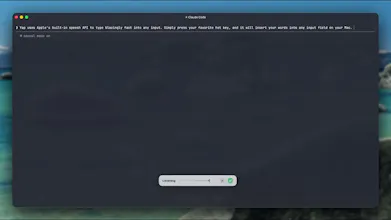
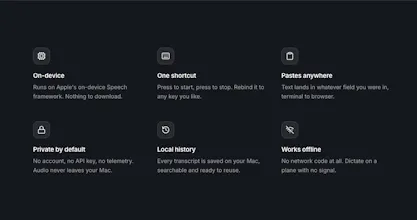
Yap turns speech into text anywhere you can type on your Mac. Set a hotkey, talk, press it again, and the words get pasted into whatever field you were in. It runs entirely on device using macOS 26's speech APIs, so there's no model to download and nothing leaves your machine. It's around 3,000 lines of native Swift in a 4 MB app that idles near 60 MB of memory. Free, MIT licensed, and built by Frigade because we wanted it for ourselves.
@cmathies Congratulations on your launch. From my initial use of Yap, it’s remarkably quick and accurate. I try out most speech-to-text apps, and this is very promising in terms of its speed and lightness. I’m used to apps that clean up my grammar and verbal stumbles, which Yap doesn’t do, but for short, quick messages and emails this looks ideal. Good luck with it!
@cronberry this is coming in the next release - currently have a PR open that does this
edit: fixed now in the latest version: https://frigade.com/yap
Paste is the part I'd want to hear about. If you're putting the transcript on the clipboard to insert it, you're stomping whatever I had copied, and that's the bug that gets a dictation app deleted on day two. Restoring the previous pasteboard afterwards mostly works but races with anything else watching it. Separately, your description says it idles near 60 MB and your comment says a few MB, worth picking one.
@asadmalik901 From my initial tests of the app, the clipboard contents are either not touched by Yap, or they are restored straightaway after the speech-to-text element is pasted. It’s idling at 39.7MB.
@cronberry @cmathies Good, that's the answer I wanted. Worth putting it on the page though, because clipboard stomping is the first thing anyone who has been burned by a dictation app will assume you do. Jonathan's 39.7 MB also lands between your two numbers, so that one is still worth correcting somewhere.
the paste-based insertion is the part i'd poke at. macOS deliberately blocks the accessibility APIs from reading or writing into secure text fields - password fields, a password manager's own vault unlock, sudo prompts in terminal - specifically so assistive apps can't fill them. does yap detect it's in a secure field and just decline to paste, or does the hotkey still fire and it dictates into empty air / fails silently there? asking because "works anywhere you can type" and "macOS explicitly carves out a class of fields no assistive app can touch" are going to run into each other somewhere.
@cmathies fair, that's a reasonable bar. three concrete ones to actually try rather than take my word for it: Terminal's sudo password prompt, 1Password's own unlock screen (not sites it fills, the vault unlock itself), and System Settings > any password field. those are the classic "assistive tech literally cannot see this" cases on macOS, separate from normal password fields in random apps which are often just regular text fields that happen to be dotted out. worth 5 minutes to check since if it does fail there it's a silent fail (no toast, no error), which is the annoying part to debug from a support-ticket angle later.
Great App. @Wispr Flow killer :-) . I tried and discontinued wisper because I thought talk to text should be part of the OS as a free feature. Looks like you guys solved that problem. One issue is verbal stumbles. If you can fix that, it will be a super cool.
@varun_raj10 just fixed in the version released today
What languages are supported?
@cmathies Ukrainian)
@natalia_iankovych Adding something practical to the 30+ answer, since language support and language quality are not the same thing here.
Yap runs on Apple's on-device speech APIs, so the languages it supports and how well each one works are Apple's, not the maker's. That is mostly good news. It means no model download and nothing leaving your Mac. It also means if your language is weakly supported by Apple today, no amount of work on Yap's side fixes it, and if Apple improves it in a point release you get that for free without updating anything.
Worth checking before you invest time: open System Settings, Keyboard, Dictation, and see whether your language is available for on-device dictation there. If it is, Yap should be solid for it. If it only works with the server option, that is the signal to expect weaker results.
Which language were you asking about? Happy to say what I would expect.
This is such a great project. I’m Korean, and I think it’s incredibly clean, polished, and easy to use. Is this built using Speech Analyzer and Foundation Models? It’s incredibly well made.
that's a great product! + after everything else being bloated, a few MB of memory and no network calls feel like such a relief.
@lina_dikhtiaruk The relief you are describing has a specific cause worth naming, because it tells you which other tools will feel the same way.
Most desktop apps in this category ship a whole browser engine to draw a menu bar icon. That is where the hundreds of megabytes go. Yap is native Swift calling an API that is already part of the operating system, so there is no runtime and no model to carry around.
The useful test when you are evaluating anything similar: check whether it is native or Electron, and whether it downloads a model on first run. Those two answers predict almost everything about how heavy it will feel six months in.
The tradeoff, to be fair to the other tools, is that being tied to Apple's API means you get Apple's languages and Apple's accuracy, with no ability to swap in a better model later. Worth it here, I think. Just not free.