
ZenithBar
The activity island Windows was missing
79 followers
The activity island Windows was missing
79 followers
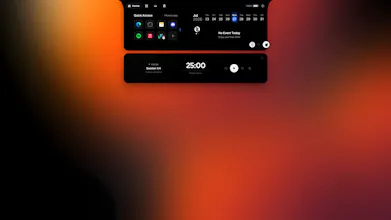
Windows has no place for what's happening right now. ZenithBar adds a floating island to the top of your screen: playback controls for any Windows media session, your next calendar events, pinned apps and sites, a file shelf you can drag straight into other apps, and a visual clipboard history. It opens on hover, disappears during full-screen games, and processes everything on-device — no account required to use it. One-time purchase with a 7-day trial, not a subscription.





The on-device-only and no-account-required call is exactly right for something that touches clipboard history — routing copied text through any cloud service is a non-starter for most developer workflows. The thing I would want to understand is how it handles clipboard events from apps with custom permission models, like Windows Terminal or sandboxed contexts: that is usually where clipboard managers either miss grabs entirely or add enough latency that you notice it.
@hi_i_am_mimo That’s a great question. Zenith Bar uses the standard Windows clipboard APIs and processes clipboard events locally and asynchronously to keep latency as low as possible. It does not attempt to bypass application permissions or sandbox protections, so content that Windows or a specific application deliberately prevents from being exposed may not be captured—and that is intentional.
Windows Terminal and most conventional desktop applications should work normally. More restrictive or sandboxed environments may behave differently depending on how they interact with the system clipboard. I’m continuing to test these edge cases and optimize performance, so reports involving specific applications or workflows would be extremely helpful.
The priority is to provide reliable clipboard history without compromising security, application boundaries, or responsiveness.
Helpful to know - standard clipboard APIs with no permission bypass is the right call, and intentionally missing restricted content is better than a tool that tries to force past application boundaries. The async part is the thing I would want to understand: is the capture event-driven using clipboard change notifications, or polling on an interval? The answer matters for apps that write to the clipboard in rapid sequence.
@hannesh Thank you! Notchify is a solid option, particularly for system monitoring and customizable widgets. I wouldn’t say ZenithBar is universally better—the main difference is that it is designed as a more complete daily workflow hub.
ZenithBar combines a persistent file shelf with folders, search, previews, organization and native drag-and-drop; a richer clipboard manager for text, links, images, colors and notes, including pins, collections and reminders; Google Calendar integration with event reminders; date-based to-do lists; and Quick Access for applications and websites.
It also automatically tracks completed browser downloads, provides accurate browser media controls through an optional local bridge, and includes weather, notifications, Pomodoro, stopwatch, battery and camera indicators, plus automatic hiding in games and full-screen applications.
If you mainly want system widgets, Notchify may already fit your workflow well. If you want the island to connect files, clipboard content, downloads, tasks, calendar and media in one place, that is where I believe ZenithBar offers a different—and potentially better—daily experience. I’d love for you to try it and let me know which approach works better for you.
the SmartScreen honesty upfront is appreciated, but I'd guess that's costing you more installs than the comments here suggest. most people aren't going to go compare a SHA-256 hash against your site, they're going to see "Windows protected your PC" and just close the installer, especially for something that touches clipboard history where trust matters more than usual. do you have any sense yet of how many people bounce right at that screen versus push through to actually try it?
@omri_ben_shoham1 You’re absolutely right—SmartScreen is likely discouraging a significant number of potential users, especially because Zenith Bar handles sensitive features such as clipboard history.
At the moment, I don’t have reliable data showing exactly how many people leave at the SmartScreen warning versus continue with the installation. However, I recognize that most users will not manually verify a SHA-256 hash, regardless of how transparent the website is.
The main limitation has been the cost of a trusted code-signing certificate. My current budget hasn’t allowed me to purchase one yet, as I was waiting for Zenith Bar to generate enough revenue to cover it sustainably. A promising number of users have already purchased the app, so obtaining the certificate is now a priority, and I expect to address this by next month.
Thank you for raising this. Trust is especially important for an application with clipboard functionality, and resolving the SmartScreen warning is urgent.
Appreciate the honest answer, and good to hear it's becoming a priority. One heads-up worth knowing before you buy: even a standard (non-EV) code-signing cert doesn't clear SmartScreen instantly, it still needs to build up reputation from real download numbers over time, so there can still be a warning gap for a while even after signing. EV certs skip that reputation-building step but cost noticeably more. Which one are you leaning toward, just so the timeline expectation is realistic?
Henry, one thing worth knowing if you haven't already run into it: even after you buy a standard code-signing cert (not EV), SmartScreen doesn't clear instantly, it still has to build up reputation from real downloads over time, so there can be a gap where the warning still shows up even with a valid signature. EV certs skip that reputation-building period but cost a lot more. Worth checking which one you're planning to get so the timeline expectation matches reality for your users.