Launched this week

AC Bridge
Your smart lights show when Claude Code or Codex needs you.
56 followers
Your smart lights show when Claude Code or Codex needs you.
56 followers
AC Bridge turns the smart lights and plugs you already own into ambient status for Claude Code and Codex. See at a glance whether your agent is working, blocked or done, and let Claude Code or Codex drive the devices you have connected, as a step in a task. Works with Hue, Govee, WLED, LIFX, Nanoleaf and more, plus Home Assistant.


Free Options
Launch Team

AWS Startup AdvisorPersonalized AWS guidance that meets you where you’re already building
Promoted


Hey Product Hunt 👋
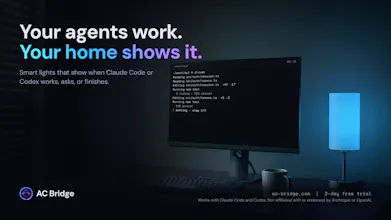
AC Bridge turns the smart lights you already own into status lights for Claude Code and Codex.
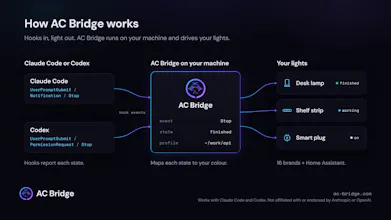
Agents spend a lot of time either working or waiting for you, and you only find out by checking the terminal or hearing another notification sound. AC Bridge listens to the agents' own hooks and changes your lights instead: blue while it works, red when it needs permission, green when it's done (you pick the colours).
What it does
Works with Claude Code and Codex, side by side, each with its own profile
16 brands driven directly on your local network (Hue, Govee, WLED, LIFX, Nanoleaf, Kasa and more), plus Home Assistant and SmartThings
Maps up to 29 agent states to colours and effects (flash, pulse, strobe and more)
Puts your lights back the way they were when the session ends
Agents can also switch devices as a step in a task. Locks, garage doors, valves and cameras are always refused.
Windows, macOS and Linux
Try it: 7-day free trial, no card needed, then £2.99/month → https://www.ac-bridge.com/
Feedback I'd love: which agent states you'd map first, and which lights or brands you'd want added next.
Can one light show both Claude Code and Codex, or does each agent need its own light?
@modiyilreji One light is enough. Claude Code and Codex can share the same light, and you don't need one per agent. If both are running, the light follows whichever session changed most recently.
@samholmes_dev Thanks, Sam. Good to know one light can handle both.
The blocked/needs-input state is the one I'd map first. Working and done are nice ambient signals, but the moment an agent is waiting on me is the only one where I actually need to stop what I'm doing and look over. Restoring the lights to how they were when the session ends is a thoughtful detail too — otherwise ambient tools tend to leave the room in a weird state.
@jcbuilds
Thanks, and agreed, needs-input is the one that actually gets me to look up. It's highly customisable too. Each state can use a different effect, like flash, strobe, pulse or colour fade, with its own colours and timing, and you choose what the light goes back to when the effect ends. You can also set up a profile so the agent is fully device aware, so you're not limited to the pre-existing hooks in the app.
My deploy checks take a very long time, so sometimes I put a film on in the front room and ask Claude to flash the light when it's finished. When I next reply, it puts the light back to how it was.
The pre-defined hooks are just the start. You can do a lot once the agents are device aware.