
Agent Browser Shield
Block prompt inject & cut token costs for AI browser agents
148 followers
Block prompt inject & cut token costs for AI browser agents
148 followers
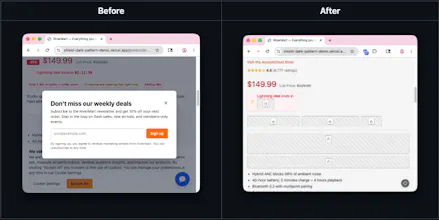
AI agents browsing the web have a problem: they read everything — cookie banners, hidden instructions, dark patterns — and can't tell real content from a trap. Agent Browser Shield sits between your agent and the web, stripping prompt injections, masking PII, removing dark patterns, and filtering page noise that burns tokens. Free, source-available, works with browser-use and Browserbase.

Free
Launch Team

Framer AI AgentsDesign and publish professional sites with AI
Promoted
@curiouskitty Great question! For us, token efficiency is a secondary benefit. Our primary focus is on prompt injection, dark patterns, and context pollution that can compromise the agent or make them fail at the task.
Because it's a normal browser extension, you can use it inside your token-efficient agent browser
The token noise problem is honestly what gets me more than the injection side. Most agent failures I've seen aren't dramatic security breaches, they're just the model losing track of what matters after reading 3 cookie banners and a footer nav in a row.
Quick question though, does the filter run once on initial page load or does it watch for DOM mutations? Asking because a lot of the annoying stuff (cookie popups, chat widgets) gets injected dynamically after the page loads.
@imoluuu great question! It watches on page load and for mutations on the page.
We’re adding an option for controlling whether it watches on inactive tabs (in case you’re using chat on pages that aren’t currently visible, but could sneakily swap out content when you’re not looking).
PII masking at the proxy layer is smart - agents leak more than most realize. Is the injection detection rules-based or does it adapt as attack patterns evolve? Static filters tend to fall behind pretty quickly in this space.
@christian_knaut Currently rules-based. We're working on adaptive patterns, but to determine what should be run on device (which might be a low-resource VM) vs. supporting external injection detection APIs
The prompt-injection angle is obviously important, but the token-noise part is what stood out to me. When using browser agents for research/social workflows, the annoying failure mode is often less "one malicious instruction" and more the agent wasting context on cookie banners, nav, footers, and hidden junk before it reaches the actual page content.
Curious if Agent Browser Shield exposes a diff or trace of what it stripped from the page. That would be really useful for debugging false positives, especially when a page has weird layout or important content that looks like boilerplate.
Congrats on the launch — this feels like one of those unglamorous layers that becomes necessary once browser agents move from demos to real workflows.
@grace_lee26 absolutely - the security is important but the token saving is a super sweet benefit.
That’s a fantastic point about the diff. We don’t have that at the moment but that would be a great feature. Would you expect to see that in console logs or where would you want that output of the diff sent?
Thanks for the support!
For debugging, I’d want two levels:
1. Dev mode: console/network-style structured trace with selectors + rule IDs + before/after snippets, so teams can reproduce false positives.
2. Human mode: a compact side-panel summary like “removed cookie banner, footer nav, hidden text block, 3 tracking widgets,” with expand-to-inspect.
That keeps the default experience quiet but gives agent builders enough evidence to trust the filter when something important disappears.
@jim_jeffers There's already some basic console debug logging when rules are applied. But to your point probably not enough to reproduce false positives without easy access to live page
Love the name "human mode"! For single page applications, would you expect the counter/rules to be for the whole page session? Or reset on SPA navigation? There are some quirks with how to do book keeping on transitions. Keeping track for the whole page session is definitely easier, so we'll likely start with that
I’d start with whole page session, but make SPA navigation visible as segments.
A cumulative “session total” is useful, but I’d also want markers like initial load, route change, modal opened, etc. That way builders can see when a specific transition caused an aggressive strip or missed rule.
Resetting on every route is cleaner, but it may hide the exact “agent got confused after the third dynamic update” failure people are trying to debug.