
Amami
Analytics that lives inside your AI assistant
80 followers
Analytics that lives inside your AI assistant
80 followers
I built Amami because switching between Cursor and browser tabs just to check traffic felt broken. It's a privacy-first, cookie-free analytics tool with native MCP support — ask Codex, Claude Code, or Cursor "how's my traffic?" and get real-time answers + optimization tips without leaving your editor. GDPR-compliant out of the box with a <2KB script (20x lighter than GA4). The fastest Google Analytics alternative for developers who ship with AI. TRY IT NOW !!!


Hey hunters! 👋
We built Amami because we kept asking ourselves: "Why do I need to open a browser to check analytics when I spend 90% of my day in Cursor?"
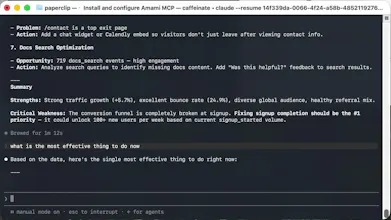
The MCP integration means your AI assistant becomes your data analyst. Not just "here's your pageview count" — but "your pricing page got 3,240 visits last week, HN visitors stay 42% longer, and I recommend doubling down on your HN launch strategy."
Happy to answer any questions about MCP, privacy-first analytics, or our tech stack!
P.S. — Try the one-prompt setup. It genuinely feels like magic the first time your AI says "I've added analytics to your project."
out Software: https://analytics.amami.dev/login
software Docs: docs.amami.dev
Shoutout to everyone checking out amami.dev on Product Hunt!
We’ve prepared an exclusive gift just for PH community members: 3 full months of Pro membership, 100% free — no hidden fees, no strings attached.
Grab your free trial right away!
Hit me up in the comments or shoot an email to watson@amami.dev if you’ve got any questions.
Exclusive PH promo code:
AMAMI-97F1E-70C61-C30E5-B87E8-1C048-171E1
@marcus_mark That's exactly it — dashboards assume you already know what to look for. We built Amami for the "what should I do?" moment. Great question on data freshness. Here's how it works: Every response includes a timestamp. When Amami pulls data via MCP, the AI includes the query range and when it was executed, so you see something like: > "Pulling data for July 14–20, 2025. Query executed at 2:34 PM UTC." And here's the key: the data your AI gets through MCP is the exact same data you see in the dashboard — same source, same numbers, same accuracy. The only difference is format: MCP serves it in a structure that's optimized for AI analysis, so the AI can spot patterns and give you insights instead of just raw numbers. If the data is cached, it tells you: > "Using cached data from 2:15 PM UTC. Fresh data available — refresh?" Recent data (last 7 days) is always live. No stale snapshots for yesterday's numbers. And you don't have to choose between AI and dashboard. Open the dashboard anytime to look around, spot something interesting, then ask your AI: "I noticed a spike on the /pricing page — what's going on there?" The AI picks up from your lead and digs deeper. Does that cover your use case?
From my experience: a dashboard sometimes shows something you weren't looking for - a spike you didn't think would happen. With a query-first setup, how do you surface the thing you didn't know to ask?
@dss_cdd Thank you, that's a really solid answer! What I'd want flagged most: silent failures. A page that quietly stops converting, or a form that drops to zero. That's usually something breaking, and it's most likely the thing worth immediate attention
@alieksia Yeah with UI elements, such as dashboard, it feels pretty natural to interact with anlaytics. Also you have control plane with which you can change filter for say, site or time range which
I think it would be good use case if User was just only interested in numbers directly crunched on their terminal or IDE. But from my lens, I do see that dashboard and UI brings authentic value when you are purely looking basic stuff like visits, sessions, demographics, page visit breakdown or recent traffic.
Anyways congrats.
I do SEO for my own product and the first 20 minutes of every morning go to checking analytics and Search Console in separate tabs. Asking Claude for the numbers inside my editor would give me that time back. Does it only track visits on my own site or can I also see which pages are winning in search so I plan content from the same place?
@abdullah_javaid3 Great question — and yes, we totally get that 20-minute morning ritual of jumping between Analytics, Search Console, and whatever else just to get your bearings. That's exactly the kind of friction MCP is meant to eliminate.
You can see both in one place. Our MCP integration connects to your site's visit data (pageviews, sources, real-time visitors) and pulls in your search performance — which pages are ranking, for what keywords, their click-through rates, and how positions are trending. So when you ask Claude in your editor, you get the full picture without switching tabs.
Here's where it gets really powerful: you can literally ask "How'd yesterday go?" and get an instant day-over-day comparison — which pages spiked, where the growth came from, what's trending up or down. No more digging through separate dashboards. And unlike Google Search Console, where data can lag 24–48 hours, our feed is significantly more real-time, so you're always looking at fresh numbers, not yesterday's stale report.
Even better — this connects directly into your AI Agent workflow. Your agent can call this MCP to pull your site's growth data, compare yesterday vs. today, and automatically act on it: restructure underperforming pages, suggest content updates, double down on what's winning — all without you manually copying numbers into a prompt. That's the AI-native feedback loop: data → insight → action, fully automated and fully inside your workflow.
That means your morning ritual becomes:
"How did my site perform yesterday?" → instant day-over-day breakdown
"Which pages had new growth?" → SEO winners surfaced automatically
"Optimize my site structure based on what worked" → your Agent executes it
Everything — analytics + search performance + content optimization — inside the same conversation. No more tab-hopping. Those 20 minutes are yours again. ☕
If you have more questions, feel free to shoot me an email directly — happy to walk through anything: watson@amami.com
Give it a try and let us know how it feels!
@dss_cdd This is a better answer than I expected, the search performance part was the missing piece for me. I will set it up on my site this week and see if it really gives me my 20 minutes back. Appreciate the detailed reply.
@abdullah_javaid3 We'd love to have you try it out — we've prepared a 3-month Pro membership for you so you can fully explore everything during that time. If you run into any issues or find something that doesn't quite meet your needs, please don't hesitate to let us know — we're actively following up and iterating based on feedback.
Our goal is to build software that genuinely solves real problems, not just another product trying to make a quick buck.
Your trial code: AMAMI-97F1E-70C61-C30E5-B87E8-1C048-171E1
Feel free to reach out anytime: watson@amami.dev
Looking forward to hearing what you think! 🚀
@dss_cdd That is really generous, thank you. I will redeem the code today and put it through real daily use on my site this week. You will get my honest feedback either way, good or bad.
finally something that fixes the annoying back-and-forth between my editor and the browser tab just to check stats. the MCP integration works smoothly, asked claude about yesterday's traffic and got a clear breakdown with actual suggestions on what to fix.
The MCP integration is genuinely clever, that part hooked me. One thing though, I'd love a way to compare traffic windows right from my editor prompt, like asking how this week stacks up against last week without opening a dashboard. That would make the AI-driven angle even more useful day to day.
Love the MCP integration idea, this is exactly the kind of thing that makes analytics actually useful inside my workflow. One thing that would seal it for me is real-time visitor counts streaming live, so I can literally watch the impact of a post I just published without refreshing anything.
@kaderj50m Thanks so much for the kind words — we're thrilled the MCP integration resonates with your workflow! 🙌
Great news: you get both daily visitor stats and a live view of who's currently on your site in real time — no refresh needed. The dashboard streams active visitor counts the moment a post goes live, so you can literally watch the spike happen as your content hits.
And yes, all tracking is fully anonymized by design — no cookies, no personal identifiers, no cross-site tracking. This means you're compliant out of the box with GDPR, CCPA, and other privacy regulations worldwide. We know how costly privacy missteps can be (those €20,000+ fines are no joke), so we built privacy-first from day one.
Would love to hear how the live stream works for your next launch! Feel free to ping us with any other ideas — feedback like yours directly shapes what we ship next. 🚀
@kaderj50m @dss_cdd the live view answer here made me want to try it too. Kader what site are you running it on, a product or a blog?
The pain is real, dashboards get built and abandoned constantly. This only works if answers are auditable, otherwise it is a confident guess I cannot defend in a meeting. Traceability is what separates this from a chatbot bolted onto a database.
@shivangit26 You're absolutely right — "confident guess you can't defend" is the worst-case scenario for AI-driven analytics.
Here's how Amami handles traceability:
Every answer shows its work. The AI tells you exactly what it asked Amami and what data it got back. Not a black box — you see the full conversation.
For example, if the AI says "your conversion rate dropped 12%," you can follow the thread:
> You: How's my conversion rate?
>
> AI: Calling Amami MCP: `get_stats` — pages: "/pricing", metrics: "conversion_rate", date_range: "July 7–13 vs June 30–July 6"
>
> AI: Your conversion rate on /pricing dropped from 4.2% to 3.7% week-over-week. Here's the breakdown:
> - Visitors: 2,891 → 3,240 (+12%)
> - Conversions: 121 → 120 (-1%)
> - Rate: 4.2% → 3.7% (-12%)
>
> Traffic went up but conversions stayed flat. Want me to dig into sources?
You see the exact tool call, the parameters, and the raw numbers the AI used. If something looks off, you can ask:
> "Show me the raw visitor count for each source"
> "Break down conversions by device type"
The AI calls Amami again with new parameters and shows you the updated data.
And here's the cross-check: the data the AI gets through MCP is the exact same data in your dashboard — same source, same calculation. So you can open the dashboard anytime, spot something, then ask your AI to dig deeper.
Every MCP response also includes a `trace_id`. Share it with your team — everyone sees the same underlying numbers.
Does that level of transparency work for your use case, or is there a specific audit requirement you need?