
Launching today

Capso
Free open-source screenshot & screen recorder for Mac
189 followers
Free open-source screenshot & screen recorder for Mac
189 followers
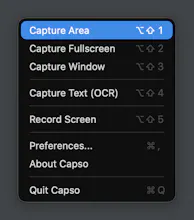
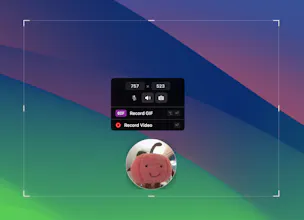
Capso is a free, open-source screenshot and screen recording app for Mac (Apple Silicon), built entirely in Swift. ✨ Features: • Screenshot (area, window, fullscreen) • Screen recording • Annotation tools • OCR (text from images) • Image beautification Think CleanShot X or Cap — but completely free and open source. No subscriptions, no paywalls, no telemetry. Just a clean, native Mac app that does everything you need.


Capso
Capso
@_anasansari Thanks for the kind words, Anas! Great question.
Capso does support capturing system audio and microphone simultaneously as separate audio tracks, so they don't interfere with each other. That said, we're still pretty early and there's definitely room for improvement in the
audio mixing department.
Would love for you to give it a try and let us know how it works for your use case! If you run into any issues, feel free to open an issue on GitHub, your feedback would really help us improve.
Okan
Building a native Mac screen recorder is no easy feat given all the strict capture permissions Apple requires. I can see myself using this daily to grab quick bug repros for my GitHub repositories. I would love to know if you built this with pure Swift or used a cross-platform framework like Tauri under the hood.
Capso
@y_taka Thank you, Takahito! Really appreciate the kind words, and yes, the ScreenCaptureKit permissions dance was quite a journey 😅
To answer your question, Capso is 100% native Swift 6 + SwiftUI/AppKit, no Electron, no Tauri, no web views. I wanted it to feel like a true Mac app, and the core capture/recording/annotation pieces are all independent Swift packages (CaptureKit, RecordingKit, AnnotationKit, etc.) that you can actually drop into your own projects if you find them useful.
Hope it serves you well, and any feedback is always welcome on our GitHub!
Based on the screenshots and videos it seems to have a very nice look and feel. Amazing that you provide that as open source and free! Despite the look and feel are there more upsides in comparison to the native mac os screenshot and video capture functionality?
Capso
@drunreal Thanks Marvin! Great question. A few things Capso adds on top of the native macOS screenshot:
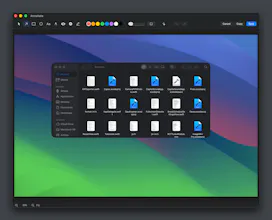
Annotation editor: arrows, shapes, text, pixelate/blur, counters, highlighter
Screenshot beautification, add backgrounds, rounded corners, shadows with one click
OCR: select any area and extract text instantly
Pin to screen: float screenshots as always-on-top windows
Screen recording with webcam PiP, 4 shapes, drag-resize, presentation mode
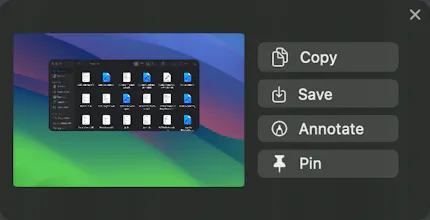
Quick Access panel, floating preview after capture with copy/save/annotate/pin actions
Basically macOS gives you the raw capture, Capso adds everything you'd want to do with it afterwards. Give it a try and let me know what you think!
@lzhgus I will definitely give it a try!
Awshar AI
One question - why we need this if mac already have this feature inbuild?
Capso
@ankit_narang1 Great question. A few things Capso adds on top of the native macOS screenshot:
Annotation editor: arrows, shapes, text, pixelate/blur, counters, highlighter
Screenshot beautification, add backgrounds, rounded corners, shadows with one click
OCR: select any area and extract text instantly
Pin to screen: float screenshots as always-on-top windows
Screen recording with webcam PiP, 4 shapes, drag-resize, presentation mode
Quick Access panel, floating preview after capture with copy/save/annotate/pin actions
Basically macOS gives you the raw capture, Capso adds everything you'd want to do with it afterwards.
Please give it a try and let me know what you think!
Finally a free alternative to CleanShot X that doesn't feel cheap. The fact that it's built natively in Swift makes a real difference on Apple Silicon.
Capso
@farrukh_butt1 That means a lot, "doesn't feel cheap" is exactly what we're going for.
Being native Swift is a deliberate choice. Screenshot tools should feel instant and lightweight, not like a browser tab running in the background. Still lots to improve, but glad the foundation feels right!
@lzhgus That's exactly it — you can tell the difference the moment you open it. Keep shipping!
free, open source, native Swift, OCR included - that's a rare combo. most tools compromise somewhere on the annotation layer.
Capso
@mykola_kondratiuk Thanks Mykola! You're right, the annotation layer is where a lot of tools cut corners, and honestly ours still has a long way to go too.
I am working on adding more tools like spotlight, magnifier, and image overlays. If there's anything specific you'd like to see in the annotation side, we're all ears, GitHub issues are always open!
That kind of self-awareness is actually rare from a maker. Worth the investment - annotation UX is what people actually feel when using a tool.
Capso
@mykola_kondratiuk Absolutely, annotation UX is the top priority for us right now. Appreciate the encouragement!
Makes sense as the priority - annotation is the thing users touch every single session, so any friction compounds hard. Every UX call there has outsized impact.