We read the AGENTS.md of the 100 most-starred repos that have one (27% of the top 1,000 do).
The consensus, in order of how much they write about it mostly: architecture and repo layout, how to test, build commands, dos-and-don'ts, PR etiquette, and code style.
Pointed it at a side project where I had Claude Code and a couple of local scripts running in parallel panes and losing track of which one had context on what. The shared-workspace idea actually works the way they describe - one agent reading a stack trace another pane dumped, without me copy-pasting it across. The visual QA piece caught a regression on a mobile viewport I would have shipped past if I was just eyeballing it myself.
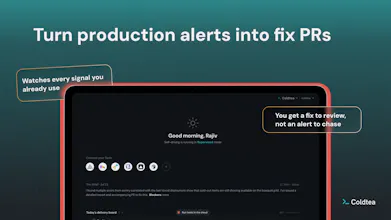
Wanted a clearer answer, before I dug through the comments myself, on what happens when production monitoring flags something - whether it's strictly a diagnosis you review or if there's ever a path where it pushes a fix on its own. That's the one thing I'd want spelled out on the landing page itself rather than having to ask in the launch thread.
I already have Cursor for the actual editing, so this wasn't a replacement decision, more of an addition. Cursor doesn't really do the cross-pane context sharing or the production monitoring side, so it filled a gap rather than competing directly with what I already pay for.
Hi Product Hunt, Ohans here from @Coldtea.ai.
Coldtea brings your terminal, end-to-end testing and production monitoring into one agentic development environment.
Terminal: Run the agents you already use, in parallel, with shared context between them. No lock-in. Your workflows stay yours.
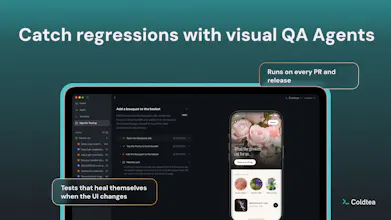
Visual QA agents: They drive your real app and catch regressions before your users do. And let you automate every release testing (supports iOS, Android and web)
AI production monitoring: Watches production after the deploy and tells you what broke, in plain language. Connects your logging, observability tools, and agent traces in one place, so you wake up to investigated fixes, not blind alerts
Tasks: Brings your engineering tasks closer to where you work. One place your team and your agents both work from, whether locally or in the cloud
Try it now: coldtea.ai
Would love your feedback; I'm in the comments all day.
Thanks!
Shipping faster was never our hardest problem.
When I was a Staff Engineer at the world's largest meal kit brand, HelloFresh, what I personally obsessed over was the part after merging a PR: how do you know a regression didn't slip through, how do you know what production is doing right now, have we architected the product right, and where does the whole team go to see it all of this in one place? That question followed me home.
Then agents arrived and made it louder. I tried every tool out there, and my day turned into context-switching between them or stringing together a custom workflow. Orchestration in one tab, QA in another, monitoring somewhere else.
It took me a while to see why none of them fixed it. Every other agentic development environment out there is pointed at the same thing: build. Run more agents in parallel, ship faster, orchestrate better.
All of that is genuinely good, and all of it is the first act. Software delivery was never just building, so the tools that only do build hand the rest back to you to figure out.
So we spent the last five months rethinking what a holistic agentic development environment for engineering teams could look like, alongside some fast-moving teams.
This is how Coldtea was born.
Coldtea is an agentic development environment for the entire software lifecycle. Not bolted on, not an afterthought. Day zero. Agents can already work across the entire stack. The next era of development environments has to do the same. That's our thought process.
Would love your feedback, especially if you're the one who gets paged when the thing your agent shipped breaks.
@mohsinproduct Yes, on shell settings, nothing to configure. A Coldtea terminal pane runs your login shell, so your zshrc, aliases, PATH and env come along the same way they do in any terminal. Custom scripts behave exactly as they do today.
Context is a different thing; what's really shared is the workspace. An agent can read what's on another pane, so if your script dumped a stack trace two panes over, Claude can read it there instead of you copying it across. Agents in separate panes can message each other (good for agent teams, e.g., one reviewer, one implementer). The whole workspace is readable context whenever an agent needs to reach it.
And anything that needs to survive beyond the session lives on the task: the description, the implementation plan, and session logs. In Coldtea, agents can equally read and write to tasks natively.
@ohansemmanuel To answer your launch thesis, the biggest gap in AI development today isn't code generation speed it's verifying that new code didn't silently break legacy features. Congrats for launch ,qq how does Coldtea integrate with existing observability platforms (like Datadog, Sentry, or Honeycomb) when pulling production incident context?
@priya_kushwaha1 for observability, it came down to one question: what's the best way to give an agent real context and let it run the discovery loop itself?
Where we landed is persistent remote machines with the provider's native CLI installed. The agent queries the source directly, narrows down, and queries again.
It reasons through the incident rather than working off a wall of pre-fetched context sitting in its window.
That also makes new providers cheap to add. If it has a CLI, we can wire it.
This also means from a isolation from a security standpoint since you can expose read-only tokens for these integrations.
it's worth mentioning the full list in the docs here: coldtea.ai/docs/platform/integrations/observability-integrations
@ohansemmanuel Makes sense for keeping it lightweight and secure. Since Coldtea queries the provider directly what happens when older Sentry data ages out? Does Coldtea persist any incident context or summaries over time or is its historical view limited to whatever the provider still retains?
@tehreem_fatima5 For most connections, it means one click, e.g., click to connect Sentry.
For Datadog, it means clicking to go to your Datadog account, creating an isolated key and pasting it into Coldtea.
So, relatively easy, I'd say.
But it varies per platform, as we adapt to what's possible given the platform's APIs.
@ohansemmanuel Hi Ohans, congrats on keeping #1 of the day! (we are trailing at #3 but far from you 😀).
I checked out your product page and keep wondering: does it mean all QA is done entirely by AI, or am I missing something? From what I know, relying only on AI for QA can cause issues... would love to know how Coldtea solves this!
@margarita_s88 Haha, firstly congrats on the launch!!!
Secondly, yes, the QA is automated via AI agents. But we apply some caching for some level of determinism.
But overall, we've built this to keep humans in control, not the other way around. So at any point in time, a human can jump in!
@ohansemmanuel thank you! :)
And thanks for the reply! Great, so the point was not to exclude humans from QA - on the opposite, one can customize the QA process to their own needs.
Love this direction. When most dev environments focus on building faster, @Coldtea.ai takes a different, calmer approach, focusing on building better. Agentic QA and monitoring, terminal and tasks, all in one place for less context-switching, and beautifully crafted by @ohansemmanuel and team.
@naviradjou could name @Coldtea.ai "the frugal ADE."
Try it now: coldtea.ai
Congrats on the launch.. My big build issues lie upstream of the QA agent.
Where does the test intent come from? If the coding agent and the QA agent both work off the same idea of what the feature should do, the check is a mirror.
And can Coldtea catch a test that always passes? Mine sat green for a week while a bunch of stuff was breaking, because it was only checking that a metadata column was present. That column could never be null, so every run came back legit.
A check that has never failed once is the thing I want flagged.
@himanshu_garg It all begins with intent! Because this is a connected system, context from the original task flows into the QA agent (when needed).
In general, intent is set by you. Always.
I'm not sure what you mean by "mine sat green ....", do you mean in some other software?
@ohansemmanuel Yes, I meant like the tests I made with claude code in my terminal. AI written tests are not complete a lot of times and need iterations. So I was kinda trying to understand that "upstream" of the QA cases - there would definition of QA requirements/product requirements where my agents normally screw up. May be you have your harness tuned for that, or any other things you noticed with making cases that look green on the surface but essentially they were probably not deep enough
@natalia_iankovych Yes, you can. And if you ever need to use Claude Code in the terminal, that's always available in Coldtea too.
However, the individual systems work equally well
@conduit_design That's a difficult question. I can explain what we really set out to solve and have designed this for:
Stability: there's no shortage of tools to run 100s of agents in parallel. Even though you can do that in Coldtea, we think building isn't enough. So, we've also focused on tying together the rest of the lifecycle - automated regression testing with QA agents and post-deployment monitoring
Simplicity: just bolting on different things together is bloat. So we took a lot of care crafting what initially feels like standalone items to work seamlessly. Every bit of the system is visible to your CLI coding agent out of the box, and works and feels like a single system.
Context switch: agents already work across the entire lifecycle. Why shouldn't our development environment?
@zrk222 So intent is given. A test is a plain-language description of what should be true: what to open, what should be on the page, what should happen when you click.
The goal is to mimic how an actual users the application (web or mobile)
The agent checks that against the running app rather than guessing from the pixels what the screen was supposed to do.
@zrk222 @ohansemmanuel fwiw you can learn more about agentic testing in @Coldtea.ai here in their docs: coldtea.ai/docs/testing/overview
hope it helps


Coldtea
Thanks for the review!
Answer is yes, it can push fixes on its own. But by default, it brings up a diagnosis you first review