
Crest
Widgets, music and Claude Code answers in your Mac's notch
157 followers
Widgets, music and Claude Code answers in your Mac's notch
157 followers
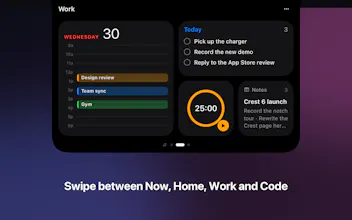
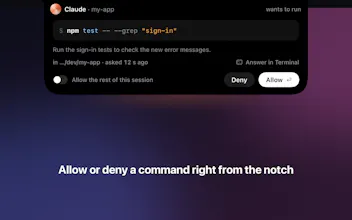
Crest turns your MacBook notch into pages of widgets you swipe through, plays your music, and lets you answer Claude Code, Codex and Copilot CLI without leaving your work. Free tier forever. Pro comes with Take and Minutes: $24.99 once or $2.99 a month.




Congrats on the launch! 🎉
The notch has bugged me since I got my M1 too. Smart move turning the most useless part of the screen into the useful one. One thing I'm curious about; What happens when I'm docked to an external monitor? I'm working remote and haven't got access to an external monitor to test it out yet.
@august_sch Thanks so much, really glad it clicks for you!
Great question, and docked is a first-class setup. External monitors don't have a physical notch, so Crest just draws its own little Dynamic Island style pill at the top center of the screen, and everything works exactly the same from there: Now Playing, stats, calendar, the lot.
You also get to pick how it shows up on external screens in Settings:
• Hidden: invisible until you hover or click the top center
• Pill: a small hint marking where to reach
• Full: an always-on pill, just like the real notch
And if you close the lid and run clamshell, Crest follows to your external display automatically. There's a "Show on all displays" toggle too, if you run multiple monitors and want it everywhere.
So no notch required. Hope that external monitor shows up soon, would love to hear how it feels when it does!
@zack40x Solid! Thanks for the clarification
Putting something actually useful in the notch is one of those ideas that sounds obvious once you see it - surprised it took this long. The translation feature is an unexpected pairing with system stats. How does it handle technical text or domain-specific terms? That's usually where inline translation breaks down.
@omri_ben_shoham1 Good question, that's where most inline translators break. Crest lets you pick the engine: Apple's on device model (private, offline) and a free no-key cloud option for everyday text, or your own LLM (any
OpenAI compatible endpoint) for exactly the technical and domain specific stuff, since it reasons about context
instead of going word by word. Honestly the general engines get shaky on heavy jargon, which is why the LLM
option exists.
Honestly the notch has annoyed me for years, so turning it into something useful is a fun idea. The clipboard history and file drop are the two I'd actually use daily. The thing that stands out though is you fixing the battery drain and post-sleep freezing, that's the reason I gave up on a similar app before. Nice work, and the one-time price over a subscription is refreshing. @zack40x @Crest
@sharun_kanan thanks a lot for the feedback. If any feature come on your mind that would fit your daily flow I would love to hear them.
Notch hub apps are addictive once you get used to them. Does Crest let you pick which widgets show per space or per focus mode?
niceee
@madalina_barbu thanks a lot !