
Cue
Put your AirPods in, your Mac starts focusing
155 followers
Put your AirPods in, your Mac starts focusing
155 followers
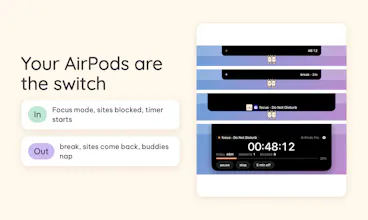
Your headphones become a focus switch. Put your AirPods in and your Mac turns on your Focus mode, blocks distracting sites and starts a timer in the notch. Take them out: break time, sites come back. Also in the notch: now playing, volume and brightness, your own colors, session history and two tiny buddies that react to everything. Free, private, macOS 14+ on Apple Silicon. Vibe-coded by one person and Claude.





Free
Launch Team / Built With


AWS Startup AdvisorPersonalized AWS guidance that meets you where you’re already building
Promoted
I would recommend to upload also EN demo video for EN version of the website. There is a higher chance to cover bigger market :)
@busmark_w_nika You're right, Nika, thank you for pointing it out. The install video on the site is still Vietnamese only, which doesn't help most people coming from here. I'll make an English version. Really appreciate the honest tip, and it's lovely to hear from another maker fighting screen time 🙏
Using your AirPods as a focus switch is such a natural trigger that I am surprised it is not everywhere, since putting them in is already the cue that work is starting. Blocking sites and starting the timer automatically removes the friction of setting it up each time. The little buddies in the notch are a fun touch. Does it work with other Bluetooth headphones or just AirPods?
@karimbenkeroum Thank you so much, Kareem, and I'm really glad the buddies made you smile 😊 Yes, any Bluetooth headphones work. With AirPods Pro, AirPods 3/4 and AirPods Max, Cue knows when they're actually in your ears, using Apple's headphone motion API. Other Bluetooth headphones (and AirPods 1/2) can't tell it that, so Cue starts focus when they connect to your Mac and starts a break when they disconnect.
the wear detection being the trigger instead of a button is the whole product honestly, that's the part that makes it actually stick versus just another focus app you forget exists. how does it handle the case where you take one AirPod out to talk to someone for 20 seconds, does that count as "break" and kill the focus session, or is there a grace window before it decides you've actually left
@galdayan Thank you, Gal, that's the part I care about most too. Good news for your case: taking out just one AirPod doesn't count as leaving, so you stay in focus while you talk. Only when both come out does Cue start a 10-second grace window before it calls it a break, so a quick adjustment never ends anything. You can set that window anywhere from 5 to 120 seconds in Settings → General → Advanced. Really appreciate the question, it's exactly the kind of real-life case I want Cue to get right.
@brandon35 120 seconds max is a smart ceiling too, long enough for a real conversation but short enough that it won't mask someone who's actually wandered off. Did you land on 10 seconds as the default from testing on yourself, or is that just a round-number starting point you'll tune later?
Using the AirPods as the trigger instead of yet another toggle is such an obvious-in-hindsight idea that I'm mildly annoyed I didn't have it first 😄 The fact that taking them out *is* the break — instead of you having to remember to end a session — means the app never becomes one more thing to manage. Also appreciate you listing the limits up front (Apple Silicon, not notarized, etc.); that kind of honesty makes me way more likely to actually try something.
@neerajnathany Haha, thank you so much, Neeraj 😄 It honestly came from catching myself opening YouTube "for one second" with my AirPods already in, so the cue was sitting in my ears the whole time. "One more thing to manage" was exactly what I was scared of building, so hearing you say it isn't means a lot. And thank you for the kind words about the limits. I'd rather you know the rough edges before you install than find them after. If you try it, I'd love to hear how it goes, good or bad 🙏
That's a great origin story 😄 I'll install it this week and let you know how it goes, good or bad right back at you!