A mission-control dashboard for teams shipping on Vercel. Connect your account and every project fills in live: traffic, deploys, uptime, and PageSpeed scores. Search Console and Bing show clicks, rankings, and indexing. SSL and domain renewals get a countdown, and failing GitHub checks get flagged. When a build fails, the menu-bar F turns red and a notification fires, even with the window closed, so you know a site's down before your clients do. Tokens stay on your Mac. One-time purchase.
Hey Product Hunt 👋
This is Richard with Coast Creative. We build and host a lot of client websites on Vercel, and FATHER started as a tool just for us.
Keeping an eye on those websites meant a lot of tabs: Vercel for deploys and traffic, Search Console and Bing for indexing, PageSpeed for speed, and reminders for SSL certificates and domain renewals. We wanted one window that watches all of it and speaks up when something breaks, so a client is never the first to tell us their website is down.
What FATHER does:
• Every website on one screen, with traffic, trends, and deploy status live from Vercel
• Click any website to see its traffic, visitor map, top pages, and referrers
• Search Console and Bing data for clicks, rankings, and indexing
• PageSpeed scores, uptime checks, and countdowns before SSL certificates or domains expire
• When a build fails, the menu-bar F turns red and a notification fires, even with the window closed
How it changed along the way:
• It started as a simple Vercel traffic viewer called MOTHER, with a retro terminal look.
• Vercel became one module instead of the whole app. Search, speed, SSL, and GitHub modules followed. You can turn off any of them, and the dashboard only shows what you use. Websites hosted somewhere else can be added by URL.
• It had to handle far more than a handful of websites, so the list sorts by traffic or trouble, filters as you type, and pins your favorites.
• We keep it in a tall, narrow window on the side of a big monitor, so the layout reflows to fit any window shape.
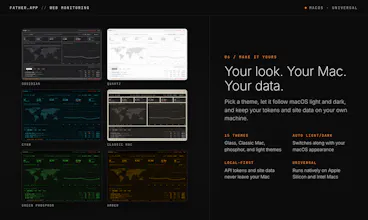
• The retro look grew into 15 themes, including macOS glass and Classic Mac. The app was renamed FATHER when it joined a suite of four Mac apps.
FATHER is local-first. Your API tokens and data stay on your Mac, and nothing is sent to us. It's a one-time purchase of $7.99 and runs on Apple Silicon and Intel Macs. One heads-up: traffic numbers need Vercel Web Analytics turned on for each project.
We'd love your feedback. What should FATHER watch next? We'll be around all day to answer questions.
Report
This would be handy for client sites. Funding out something broke because the client tells you is never a good feeling.
@victor_guichard12 It really isn't, Victor. That feeling is the reason we built FATHER. Alerts come through as macOS notifications even with the window closed, so you hear about a problem before your client does.
Report
I'm about to launch a product on Vercel and may need something like this real soon!
@matthewabbottdev Good luck with your launch, Matthew! One tip for when you set it up: turn on Vercel Web Analytics for your project, since that's where FATHER gets its traffic numbers. Deploys and uptime work right away.
Report
This seems pretty useful for hosting sites of different clients or own multiple products. I'll take a look.
@constships Thanks, Julian! That's exactly how we use it. You can pin the websites you care about most, sort by what needs attention first, and click any one to see just its numbers. Hope it earns a spot on your desktop.
Report
The red menu-bar alert when a build fails is a small detail but I can see it being really useful when you have several sites to keep an eye on.
@zulma_cink Thanks, Zulma! That little F ended up being one of our favorite parts. It shows a dot while a build is running and turns red when something needs you, so you can leave the window closed and still know how every website is doing. Click it and the full dashboard opens.
Report
Can FATHER monitor projects from multiple Vercel accounts or is it limit to one account?
@tom_nick1 Great question, Tom. The ability to monitor multiple Vercel account is being added to the next release. Right now FATHER connects to one Vercel account at a time, and you pick which team to watch in Settings. You can switch teams there anytime. Websites from another account can be added by URL for basic status checks, but their traffic and deploys won't show.
Report
I like the idea of a lightweight Mac dashboard instead of constantly checking several different services. The one time purchase is also a nice change from another monthly subscription.
@zeeshan_aslam2 Thanks, Zeeshan! That was the whole idea. Nobody needs another tab or another monthly bill. FATHER is a one-time purchase, and your API tokens stay on your Mac.
FATHER
This would be handy for client sites. Funding out something broke because the client tells you is never a good feeling.
FATHER
@victor_guichard12 It really isn't, Victor. That feeling is the reason we built FATHER. Alerts come through as macOS notifications even with the window closed, so you hear about a problem before your client does.
I'm about to launch a product on Vercel and may need something like this real soon!
FATHER
@matthewabbottdev Good luck with your launch, Matthew! One tip for when you set it up: turn on Vercel Web Analytics for your project, since that's where FATHER gets its traffic numbers. Deploys and uptime work right away.
This seems pretty useful for hosting sites of different clients or own multiple products. I'll take a look.
Congrats on the launch and good luck!
FATHER
@constships Thanks, Julian! That's exactly how we use it. You can pin the websites you care about most, sort by what needs attention first, and click any one to see just its numbers. Hope it earns a spot on your desktop.
The red menu-bar alert when a build fails is a small detail but I can see it being really useful when you have several sites to keep an eye on.
FATHER
@zulma_cink Thanks, Zulma! That little F ended up being one of our favorite parts. It shows a dot while a build is running and turns red when something needs you, so you can leave the window closed and still know how every website is doing. Click it and the full dashboard opens.
Can FATHER monitor projects from multiple Vercel accounts or is it limit to one account?
FATHER
@tom_nick1 Great question, Tom. The ability to monitor multiple Vercel account is being added to the next release. Right now FATHER connects to one Vercel account at a time, and you pick which team to watch in Settings. You can switch teams there anytime. Websites from another account can be added by URL for basic status checks, but their traffic and deploys won't show.
I like the idea of a lightweight Mac dashboard instead of constantly checking several different services. The one time purchase is also a nice change from another monthly subscription.
FATHER
@zeeshan_aslam2 Thanks, Zeeshan! That was the whole idea. Nobody needs another tab or another monthly bill. FATHER is a one-time purchase, and your API tokens stay on your Mac.