Ikuna
Launch your workspace in 3 seconds
127 followers
Launch your workspace in 3 seconds
127 followers
Your Mac does not know you are trying to focus. It keeps everything open at once: old tabs, past Slack threads, and apps from another role.
Every time you switch projects/roles, you rebuild your setup.
Find tabs, open apps, drag windows back into place, and lose your train of thought.
Ikuna saves the whole setup as a named workspace: every app, tab, and window position. One click, and it is all back in under 3 seconds.
This is the 2nd launch from Ikuna. View more
Ikuna
Launched this week
Built for people who wear multiple hats. Designers who also write. Founders who also sell. Developers who also support.
Every role needs different apps, tabs, and windows.
Ikuna saves each setup and launches it in under 3 seconds.


Free Options
Launch Team / Built With


Ikuna
Hey PH 👋
I’m Roberto, founder of Ikuna.
I started building Ikuna in 2020 after noticing a problem I could not ignore: context switching was killing my focus. Not just mentally, but practically.
Every time I moved from one role or project to another, I had to rebuild my workspace:
open the right apps, find the right tabs, move windows back into place, and try to get back into flow.
It sounds small, but it adds up fast.
Ikuna solves that by saving your full workspace, apps, tabs, and window positions, and restoring everything in under 3 seconds.
This new version is more stable, more modern, and comes with new features plus a Pro plan that helps support the next stage of the product.
The bigger vision is to make Ikuna a true productivity layer for people juggling multiple contexts every day.
Would love your honest feedback and I’m happy to answer anything in the comments
For personalised onboarding, feature requests, here is my email:
roberto@brnsft.com
Product Hunt
Ikuna
Hy@curiouskitty
When a monitor is unplugged, we deliberately don't auto-rearrange. Undocking felt to us like a context switch the user is initiating, not an error to recover from automatically. So we wait for them to decide.
That said, if you've set up Ikunas for different display configurations, it does get smarter: we detect the change in monitor state, and the right Ikuna activates automatically. Plug in your external monitor → your 2-monitor Ikuna starts. Unplug → your single-screen Ikuna takes over. Monitor identity is tracked via a local device fingerprint, so it's reliable across sessions without any cloud dependency.
The tradeoff: if you haven't set up configuration-specific Ikunas, you're on your own after undocking.
Very cool! Used to do this with some Automator Apple Script but this tool is way better!
A bit feedback:
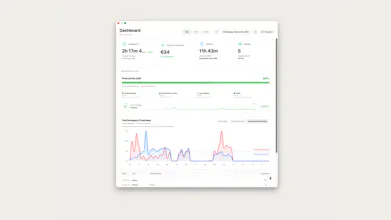
The dashboard looks beautiful and I am looking sooo forward to see some stats after a few days!
I was very lost creating my first ikuna space. I was searching for a button to save the current state for very long and couldn't figure it out... I removed the App Shortcut directly in the beginning, because I thought it would not be needed. Yea turns out it was :D I didn't find any other way opening the menu to create a new space, please add one.
I have 3 monitors and was expecting that Ikuna rearranges the apps to the correct screen - either it's not working like that or bugged. I have linked the monitors in the space setting.
Bug: It is opening Google Chrome and Spotify when switching a space even though this is not included in my space.
Small bug: In the settings the "Short menubar version" toggle is switched up. It says"Hide the app name in the menu bar" but it needs to be toggled off to hide it, not on
In general, cool tool, looking forward for some improvements but really seeing the potential! If you need any more feedback let me know
Ikuna
Thanks @ramin_ for your feedback, this is exactly the kind of thing that helps us improve!!
Will get right into fixing those other bugs, I'll reply here when the update is live
Ikuna
Hy again @ramin_
I couldn't find a way to create a new space without the shortcut.
We've added a "Save Space" button directly in the menu bar popover that appears when no workspace is active. We also made the entire header area (the Ikuna icon + version at the top of the popover) tappable to open the quick switcher at any time.
And ofc, if you have the app in the app tray you can launch it from there.
It's opening Google Chrome and Spotify when switching a space even though they're not included
The root cause was that auto-save was snapshotting all running apps (including ones open in other spaces like Chrome and Spotify) and writing them into the workspace. Now auto-save only updates window positions for apps that were originally part of that workspace.
Short menubar version toggle is inverted
Fixed — toggling it ON now correctly hides the app name (short mode), as the label suggests.
Monitors rearranging apps to the correct screen
This one is on our radar. Multi-monitor window restoration is something we're actively working to improve. If you're able to share more details about your setup (e.g. which apps don't land on the right screen), that would help us a lot!
Thanks again, really appreciate you taking the time. Stay tuned! 🙌
Reminder: Ikuna works only if you grant it the right to do so from Privacy & Security > Accessibility
Update might bug and reset that.
I switch between two projects daily, each with a different set of tools and tabs. Rebuilding everything costs me a few minutes each time. Is there a way to automate switching between workspaces, like triggering it from a calendar or schedule?
Ikuna
Hey @klara_minarikova, yes, this is very much one of the directions Ikuna can go.
Right now, Ikuna helps you save and restore workspaces quickly, so switching between projects does not mean rebuilding your setup every time. You can already launch workspaces directly from the app or use dedicated shortcuts for them.
Scheduled or automatic switching, like from a calendar event, time block, or external automation, is something I find especially interesting because it matches how many people actually work.
Curious, what would be your ideal setup?
Automatic switching based on calendar events
Scheduled switching at specific times
Manual switching with a shortcut or one click
Would love to know which one fits your workflow best.
Woah, that sounds awesome. I definitely need to try it.
What happens with opened apps when switching workspaces? Are these processes stopped, or do they still run in the background? Just wondering, because for work I have a lot of processes running which consume too much resources the system can become slow. Just wondering if switching to let's say "personal" could free up resources that at least this workspace is running smooth.
btw: I just downloaded the app and installed it. When I want to run it I only get a finder message, that the app cannot be opened.
Ikuna
Hello @vuhrmeister,
What happens with open apps when switching workspaces?
We gave you a few options.
1. Do nothing. By default, the app just launches everything on top. In case you want to layer things.
2. Clean Space before launching.
You can choose here to hide(minimise) or close the apps you have open.
This would free resources in your case.
Ps. What is exciting is also the option in Edit Ikuna > Extra to "Auto-Save" which triggers a Save Ikuna(Space) before closing, stopping an Ikuna.
Hope it helps!
@hanas_roberto Sounds great … need to test it … if I only could open it (see my other comment).
Ikuna
@vuhrmeister
Ikuna is launching. There was a CI/CD Pipeline bug that we fixed.
Please download it again.
Read the description a few times and came away with a slightly different interpretation each time, IMO the positioning needs some work. There's something interesting here but it's not landing clearly enough for me to know what it actually is yet - I think I already do a version of this using tab groups on safari for each workflow opened as a new window in their own desktop space, separate desktop spaces with their own apps plus focus modes setup for each workflow.
Ikuna