The pitch of "we studied your business and built the automation" instead of "here's a generic template, customize it yourself" is exactly the gap that's kept most small businesses from actually using AI. Every no-code automation tool I've tried assumes you already know what to automate; this one seems to figure that part out for you.
The approval-gating for outward-facing actions is reassuring, but I'd
want more visibility into what counts as "critical" by default versus
what quietly runs without a human in the loop - that line probably
looks different for a solo founder versus a 20-person team.
Looked at Make and n8n before, but those are still fundamentally
"build it yourself" tools, just with a nicer visual canvas. LemonLime's
pitch of skipping the building entirely and just describing what you
want is a different category of solve, especially for teams with zero
engineering time to spare.
connects to your existing tools and starts suggesting automations on its own instead of making you figure out what to automate first. that's the part I actually like - most workflow tools assume you already know exactly what you want built, this one surfaces the ideas for you. setup was quick too, no real learning curve to get the first automation running.
the approval step for anything that touches real data feels a bit rushed - the window to review and approve an auto-suggested automation before it expires is short, and if you're mid-task when it pops up you can miss it. would rather see a longer or configurable approval window than have it silently expire and require re-triggering.

@jordanlemon what happens when tool APIs change or data structure shifts in connected apps like Linear? does it flag drift or auto adjust the agent?
@mohsinproduct Realistically, whatever stays intact will be left complete, API changes we're able to repair on our end pretty quickly so it's seamless for our users, knowledge isn't damaged and functionality isn't broken, it just creates a lag period where some things may not be 100% live temporarily.
@jordanlemon Congrats on the launch! The "maintenance liability" point you raised is the one I keep coming back to with agent-built automations generally. When the shared automation core needs to adapt to a customer-specific workflow, does that customization live in a layer you can still push core updates through?
@xichiwoo The good news is void of actual API changes from the connection platforms themselves, the agents and automations are self-learning and regularly suggest available improvements and enhancements automatically, which saves the burden of maintenance liability.
To your second point, automations aren't hard-wired, meaning you can run a "sales" automation and it isn't going to perform exactly the same for one customer vs. another. It's meant to be flexible and work with you, not against you.
@jordanlemon The single-prompt angle is smart. How do you handle when users have wildly different workflow styles — does the model pick up on that or do you need guidance?
The per-business adaptation is the right instinct, but it's also the thing that bites at scale, and I say that as someone who built custom AI implementations before productizing. Every bespoke automation you ship is a maintenance liability the day an underlying API deprecates an endpoint or a model update shifts a prompt's behavior. Ten custom builds is fine, a few hundred and you're spending all your time patching drift instead of onboarding. How are you keeping the per-customer customization from turning into per-customer upkeep? Some shared automation core underneath, or is each one genuinely hand-built?
@dipankar_sarkar Yep, you're onto it. Good catch. We came from customer consulting as well, and pivoted because we realized so much of the work upfront was actually just finding and organizing things, the "company brain" buzzword being used. This is the shared automation core you're talking about, which acts as the roads for which our cards (agents) can operate much more effectively for them.
"Single prompt" automation is an interesting promise, but the hard part is usually the step after the prompt, where the tool has to understand the actual shape of your workflow well enough to not break it when an edge case shows up. Curious what "existing workflows" means in practice here. Are you parsing something structured like a Zapier chain or a documented SOP, or is it inferring the workflow from a freeform description the user types? Those are pretty different problems, and the second one gets messy fast.
@fberrez1 There's two things that happen here, so I'll share both.
First, it's inferring the workflow from the context it's able to gather from your existing tools.
For example, let's say there's around 5 emails that go back and forth when your business closes a customer. Somewhere in there, there's a written proposal, and somewhere past that, you include a social media mention announcing the partnership/sale.
Once you've connected your tools, LemonLime is going to pick up on this pattern, with greater strength and accuracy the more tools connected (partially because it's better able to differentiate between repeat patterns and one-off work). So, the next time a sales lead comes in, LemonLime is basically going to propose "here's what normally happens in a sales flow, I already know your language, what we should be pushing for, and what to include in the proposal." Then, if everything looks good, you can literally click a single button and it'll follow through. This is the self-learning, self-creating side.
For people looking for more control or building new automations/flows that don't already exist or haven't been surfaced by LemonLime, that's where the freeform description comes from. Instead of inferring (which, you're right, can be messy), LemonLime recognizes the difference between taste and measured result, and plans around that. What that means is things that are more subjective will actually come back to the user asking for input, or it'll show them options to choose from. Things that are more objective ("we A/B tested these strategies, and option B is performing best") it's going to make the more optimal decision, and where applicable bounce that decision to you for approval first. Instead of "inferring", it's getting the actual answer.
"studies your business and self-creates agents" is the part i'd want to understand better before committing. most automation tools require you to map out the workflow yourself, so if this genuinely infers what needs automating from how your tools are already being used that's a meaningful step up. what does the study phase actually look at? connected app data, usage patterns, something else? and how long before it surfaces suggestions that are actually relevant to how your team works?
@shubham4real Exactly. That's why we're so excited about this. Mapping out the workflows yourself is a huge pain in the

Our whole goal is to eliminate that, because it's way too much work for busy teams.
To your point, yes, it looks at your connected tool usage, any existing outlined processes (like maybe an uploaded document like "Sales Funnel"), your CRM stepping to determine what funnel might implicitly already look like, etc. The suggestions relevant to your team/role specifically are surfaced immediately upon finishing the onboarding learning period (after you connect your tools, it takes an average of 15-30 minutes to finish studying everything it finds).
Over time, it'll get even smarter (intuitively, because more context/usage helps inform it and create more patterns), but you should get really strong answers on day one. If not, give it more context, it can only see what you show it!
The roads metaphor lands, and centralizing the org and retrieval layer is genuinely the leverage point. The bit I'm still chewing on is drift on the connectors themselves. When we centralized tool schemas in our own agent stack, one endpoint change surfaced as a single contract failure instead of quietly breaking six agents at runtime, which was the difference between a five-minute fix and a Friday. Does the shared core hold a schema contract per connected tool so you catch that centrally, or does each agent hit the breakage on its own?
@dipankar_sarkar The layer is resilient and updates itself over time – a retrieval call that fails doesn't break anything, as the knowledge layer already exists. But, what it might do in theory is cause live updates to lag, which is still not great. Fortunately, this is scoped to each connection independently, so one connection going awry doesn't slow down the others.
That per-connection scoping is the right isolation call. The thing I'd watch is that a lagging update is quieter than a failed retrieval: the agent still gets an answer back, just an outdated one, so there's no error for anything downstream to trip on. When we ran a cached knowledge layer, the stale-but-available reads kept uptime high but produced the most confident wrong answers we saw, because nothing knew the data was six hours behind. Do you surface a freshness signal per connection that an agent can actually read before it acts, or is staleness invisible to whatever consumes the layer?
@dipankar_sarkar Exactly, awesome catch. Yep, when called, we're checking freshness – stale content can still be referenced where helpful, but it's going to be flagged accordingly.
Congrats on the launch! A lot of workflows break down not on the automation logic but on messy, inconsistent inputs. When LemonLime builds an automation around that kind of variability, does it need clean structured data upfront, or is handling that part of what it figures out on its own?
@benjouss Benjamin you win the golden ticket for asking this question. This is my favorite part to talk about.
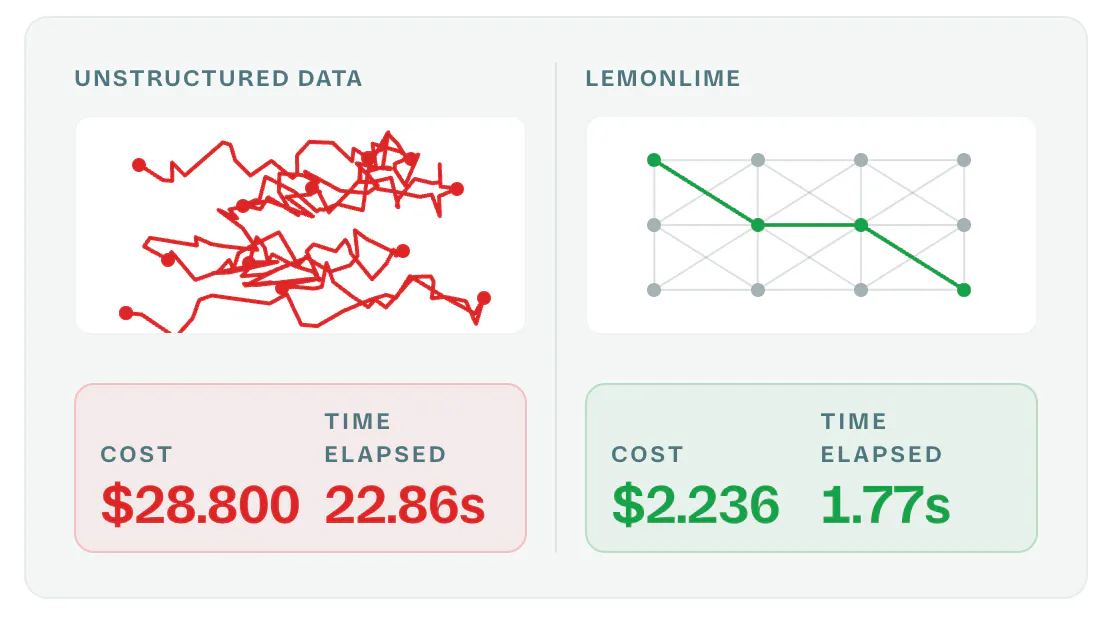
AI completely breaks down on messy inputs. This isn't even the half of it. Data in the wrong format, inconsistency (like you mentioned), missing entirely (hallucination risk), poor efficiency of retrieval/context windows growing (becomes dumber AND more expensive), there's so many issues.
LemonLime's self-creating automations were actually the second step in our product building journey. The first was building knowledge layers that handle these spaghetti cases. Navigating the same amount of data points, structured architecture purpose-built for AI retrieval and reasoning is faster, cheaper, and smarter.

This was one of our biggest learnings from working with so many companies even before LemonLime. Data is messy, and that's killing AI initiatives by harming outcomes and bank accounts. Not ideal.
So, the layer underneath that runs LemonLime is actually a unique knowledge layer built on your company's context. That's what makes deploying automations on top quick and accurate. Your data can stay human (messy), and on the backend, we take care of translating it and "organizing your books" before passing it to your agents.
@jordanlemon That's a great insight, the "knowledge layer" approach makes sense. Out of curiosity, how deep does that translation layer go? E.g. does it handle actual document parsing/extraction (PDFs, scanned files, Office docs) itself ?
@benjouss Yep, it handles actual document parsing/extraction as well – there's two exceptions, but we're working on both right now. For PDFs where text is not highlighted (like the scanned files you mention), it's not yet parsing non-text, and this same thing applies to reading text on images as well.
Something we're working on!


LemonLime
Super helpful feedback, glad you're having an amazing experience, we'll chat about your approval-gating recommendation today!