
Mirage
Turn your SaaS into a clickable demo in 90 seconds.
344 followers
Turn your SaaS into a clickable demo in 90 seconds.
344 followers
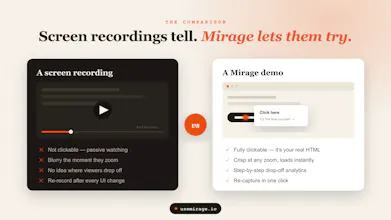
Most product demos are a 40MB video nobody finishes or a $500/mo tool no bootstrapper can justify. Mirage is the third option: capture your real app in one click, add guided hotspots, and publish a clickable demo you can embed anywhere in ~90 seconds. Track views, completions, and per step drop-off so you fix the leak instead of guessing. Perfect for landing pages, PH launches, and onboarding emails. First demo is free forever.


@anukarop 90 seconds is the capture, but the part that eats my team's time is editing tooltips and scrubbing customer data out of screenshots. How much of that is automated? Asking because the last tool we tried was fast to record and then two hours of cleanup per demo.
@artem_fedorovich Great question. Cleanup is where most tools slow you down. With Mirage, you can edit tooltips and swap screenshots after capture, so fixing copy or redacting data takes minutes, not a full re-record.
@anukarop What was the single hardest UX trade-off you faced while designing Mirage’s capture flow, and how did you decide which side to favor?
@swati_paliwal The hardest trade-off was auto-capture vs. control: record every click and you get a complete but bloated demo, or hand-pick each step and risk people abandoning halfway.
We chose capture-everything-first, then make trimming dead simple in the editor. This is way easier to delete extra steps than to realize you missed the one click that mattered.
@anukarop Congrats on launching Mirage! The "no login, no cookie wall, no book-a-call gate" line on your site is doing more selling than most demo tools manage in a whole page! That's the actual pitch, not the price comparison: you're letting buyers trust you before they've talked to you, which is a harder thing to build than it looks.
I'm eyeing this for my own Sept 9th launch - clickable beats a video when someone's giving you 20 seconds.
@anna_ludwinowski Thanks Anna! All the best for your launch.
@anukarop Thank you - it'll be my first one!
A lot of teams know people leave somewhere during a demo, but they dont always know exactly where the interest drops. That kind of insight seems just as valuable as the demo itself.
One small idea: have you thought about adding a way to tag hotspots as "must see" versus "optional"? That could help people build shorter demos for first-time visitors while keeping deeper content available for users who want to explore more.
@johan_nystrom Thanks! Really appreciate the suggestion. We love the "must see" vs "optional" hotspot idea and will be adding it in one of our next product updates! 🙌
Great timing for me personally — I'm mid-way through building a demo video for my own launch, and the "clickable" angle is interesting since most demo tools just produce a static walkthrough video. How are you handling the underlying app state for the clickable version — is it recording real interactions and replaying them, or simulating a fake environment? Curious how much fidelity you get without literally embedding the live app.
@abhineetarora Second approach, Mirage takes a snapshot of each screen from your real app, then puts clickable hotspots on top. So it's more of a frozen replay than the live app running; which means no auth or data headaches, it loads instantly, and it keeps working even if your backend changes later. Fidelity stays high since it's your actual UI, not a mockup. Best of luck with your launch, you've got this!
@anukarop That makes sense — frozen replay is a smart tradeoff, you get the "it's really my product" credibility without the backend fragility of a live embed. Appreciate the detailed answer, and the good luck wish! Back to my own screen-recording grind for now, but this is a genuinely interesting approach for embedding an interactive demo on our own site down the line.
Ninety seconds to a clickable demo is impressive. The hard part is usually state isolation: capturing real product behavior without exposing live data or breaking authenticated flows. The tradeoff between intercepting API calls vs. DOM snapshotting is real, and each approach has different fidelity tradeoffs. How does Mirage handle authenticated routes? Does it replay requests or work from static snapshots?
@anand_thakkar1 Mirage captures the rendered DOM as you navigate authenticated flows, creating static snapshots instead of replaying live requests. That means nothing connects to your backend during playback, so no live data or tokens are ever exposed. You give up real request replay, but in return you get isolated, reliable demos that continue working even as your API evolves!
The per-step drop-off tracking is the part that makes this more than a screenshot tour; seeing exactly which hotspot people bail on is what you actually need to fix a launch page. When I capture my real app, is the demo a snapshot of the screens at capture time so it stays stable even if I ship UI changes the next day, or does it re-pull from the live app and risk breaking mid-demo? And can I capture an email at a specific step without forcing the signup wall you're pitching against?
@hazy0 Yep, it's a static snapshot captured at recording time, so your demo stays stable even if your app or API changes later. And yes, you can start from any authenticated state or specific screen, including after entering an email, without forcing viewers through the signup flow.
Static snapshot with the option to start post-auth is exactly what I need for a launch demo, thanks. Since it's frozen at capture time, when I actually ship a new step or screen do I have to recapture the whole flow, or can I re-record just that one screen and splice it in? And if I recapture, does the per-step drop-off history carry over or does the funnel reset to zero so I lose the pre-change baseline?
@hazy0 Great question! Right now you'd just recapture the updated flow, which only takes a minute or two. We don't support replacing individual screens yet, but it's definitely on our roadmap. As for analytics, each published demo has its own tracking, so the new version starts collecting fresh drop-off data while your previous demo's analytics remain available for comparison.
the per-step drop-off tracking is the feature that actually sells me, most demo tools stop at view counts and leave you guessing which step lost people. once you see a specific hotspot is where viewers bail, can you edit or reorder that step without recapturing the whole flow, or does a change mean starting over
@galdayan Yeah, that's exactly the part I cared about most. View counts just tell you people showed up, not where they quietly gave up. So once you see a hotspot where folks are bailing, you can just fix that one step; reword the tooltip, move the hotspot, reorder it or just swap the screenshot and republish. You just patch the spot that's leaking and move on.
Congrats on the launch! QQ - when someone re-skins a demo with an updated UI, does the choreography still hold or do the hotspots and cursor path drift off the new screenshot? Curious how much re-tuning a normal UI change costs before it feels directed again. Neat product!
@artstavenka1 Thanks! Good question, and honest answer: hotspots are pinned to coordinates on the screenshot, so if the new UI keeps roughly the same layout, the choreography holds fine. If things moved around, the hotspot and cursor can land a little off, and you'd nudge them back into place on that step. It's a drag-and-drop fix per screen, not a rebuild, so a normal UI refresh is usually a couple minutes of re-tuning to make it feel directed again. Bigger redesigns cost more, but you're only touching the steps that actually changed.