
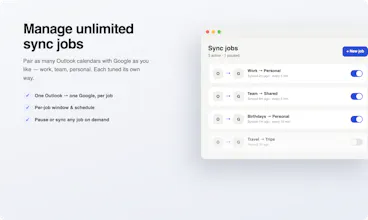
Outlook Google Calendar Sync for Mac keeps your Outlook events mirrored into Google Calendar without needing Microsoft admin approval. It runs locally on your Mac, supports multiple calendar sync jobs, avoids sending duplicate invites, and quietly keeps your schedule up to date in the background.




 CalendarSync
This solves such an annoyingly specific problem 😅 Congrats on the launch, definitely going to give it a try.
@aamirxv2 Thank you, let me know what you think!
the "no admin approval, no OAuth app to grant tenant-wide access" part is exactly why I'd never gotten our IT to greenlight the Windows tools that do this. one thing I'd want to know before relying on it daily: what happens when a recurring meeting gets rescheduled or cancelled in Outlook - does the mirrored Google copy update in place, or is there a risk of ending up with a stale duplicate sitting on the calendar?
@galdayan The no OAuth requirement is one of the biggest selling points here. Reduces a lot of friction a majority of people face inside of an organization account.
Recurring meetings are supported. When a meeting is rescheduled or cancelled in outlook it will reflect on the Google side as well. There is also cancellation support. If an instance is cancelled, it will reflect as cancelled in Google.
You have the option to enable deletions if you desire. If enabled, when an outlook event is cancelled, it will delete the corresponding Google event.
There are a lot of edge cases with recurring events, so if you do decide to try it and run into any issues, please reach out to me and I will get it resolved for you. I have used this daily for the past 6 months and just recently decided to release it to the public.
@blake_connally that's a genuinely reassuring answer, the deletion behavior being opt-in rather than default is the right call since a silent delete on the wrong side would be way worse than a stale duplicate. six months of daily use before shipping it publicly says a lot too. going to give it a try on my work calendar, appreciate the offer to help if something recurring acts up
This solves one of those small but surprisingly frustrating problems. Keeping calendars in sync shouldn't be this hard.