
Sider Omni Sidebar
Give every Mac app an Agent Sidebar
720 followers
Give every Mac app an Agent Sidebar
720 followers
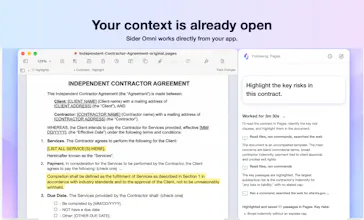
An AI agent beside any Mac app. Sider Omni sidebar sees what's on your screen and acts on it directly, right where you're working. Watch the result, ask for the next change. Nothing to copy, nothing to upload. Built on GPT-6 Astra, and it can run on your existing ChatGPT or Codex credits.




Astra made it possible for us, for the first time, to successfully rewrite Omini Bar's complex Computer Use and Browser Use systems.
These features require coordinating macOS accessibility, visual understanding, browser control, interaction recovery, and tool protocols across a large codebase—work that previous models such as 5.6 could not complete reliably.
Astra can correctly execute complex, multi-step development tasks and automate real UI testing, from identifying failures and tracing their causes to implementing fixes and verifying the complete interaction.
This has dramatically reduced development and testing time, enabling us to build capabilities that were previously impractical to complete.
Hi! We're the team behind Sider Omni. 👋
We built Sider Omni so your agent can join the work you're already doing, with the context to understand it and the ability to act on it.
With a table open in Numbers, ask: “Create a bar chart of sales by region from this table.” 📊
Sider Omni reads the table already on screen and builds the chart in Numbers. As you inspect it, keep refining: “Now show return rates by region in a separate chart.” 🔁
You can see the source data and each change in the same workspace, then ask for the next step without exporting data or starting over.
You can also choose from supported models, including GPT-6 Astra, and pick a companion icon that follows you across your apps. ✨
We'd love to hear what you'd use Sider Omni for. 💬
How does it decide which AI model or tool is best suited for a specific task and can users customize those preferences?
Congrats @rick_fan & team!
@rick_fan @hamza_afzal_butt Thanks! You can choose the AI model, while Sider Omni automatically picks the right tools for each task—such as browser actions, desktop app control, file handling, and terminal commands.
@hamza_afzal_butt Thank you, Hamza, you can do a lot of configuration right there in the settings.
I realy like the product. However im a zero technical guy and facing issues using. The charcter which is supposed to hover around each app disappears after 1st use. n then it doesnt come up even with shortcut. it only works if i open sider omni app n click open. which obviously defeats the entire purpose. i tried firefighting using gpt but the steps it told me - check permissions etc, ive already done. so im guessing its a debugging issue which im incapable of handling. msgng here in case anybody can help. else will have to uninstall this useful product
@rohit_sarawgi I’m really sorry you’re running into this, especially after you’ve already checked the permissions. I take this seriously and would like to investigate it personally. Could you email me at haytianli@gmail.com? If you’re comfortable sharing a short screen recording showing the companion disappearing and the shortcut not bringing it back, that would help me find the cause faster. Thank you for telling us before giving up on it.
@rohit_sarawgi One more thing to try while I investigate: click the Sider Omni icon in the menu bar at the top right of your screen. If you see Show Character, select it and see if the companion reappears. Even if it does, I’ll keep looking into why it disappeared.
Really nice. Is it safe to use :)
Also, do i need a local LLM to run this?
@chilarai Safety is a big priority for us. Sider Omni only reads the screen context needed for a task you start, and the default Ask for approval mode asks for confirmation before important actions. You don’t need a local LLM—you can use Sider’s model service or connect your own ChatGPT/Codex account.
@rukhsar_amjad Thank you! The biggest difference is that Sider Omni follows the window you’re working in, understands its context when you start a task, and can take action across desktop apps and the web—without making you move everything into another AI chat window.
Does the data leave your local space?
@busmark_w_nika The data still needs to be processed by a large language model; you can choose the model you trust. Thank you, Nika