
Superhuman Go
The AI assistant that works where you do
253 followers
The AI assistant that works where you do
253 followers
Go works inside Gmail, Slack, your docs, and your browser nudging better phrasing, drafting replies that sound like you, and prepping meetings before you think to. Add no-code agents that run on their own schedule. Free to start.




Free Options
Launch Team

Render: Get up to $100K in startup creditsThe fastest way to deploy and scale apps and agents
Promoted
Superhuman Go lives inside the apps you already use - Gmail, Slack, docs, your browser, instead of a separate chat window.
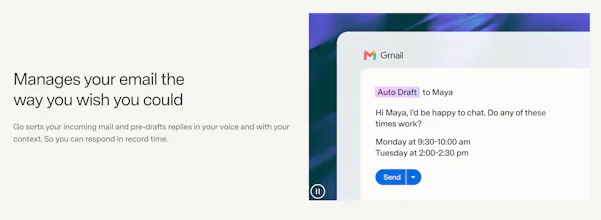
It suggests edits as you type, drafts email replies in your voice, and preps meeting agendas before you ask. No switching tabs, no re-explaining context each time.
What makes it different: it's proactive instead of prompt-based, and it's backed by Grammarly's 17-year writing engine rather than a new AI starting from scratch.
Key features:
Real-time suggestions as you type, across apps
Pre-drafted email replies in your voice
Meeting prep and follow-up (agendas, task assignment)
Custom no-code agents that trigger on a schedule or event
MCP connectors so suggestions are grounded in your real tools
Who it's for: anyone who wants AI help in the flow of their work, not in a separate window they have to remember to open.
Try it superhuman.com/go
P.S. I hunt the latest and greatest launches in tech, SaaS and AI, follow to be notified → @rohanrecommends
@rohanrecommends How does it know my voice sound like me? Does it look at my old emails or do I gotta type stuff in?
Maybe @Pretty Prompt should work inside Superhuman Go!
"proactive instead of prompt-based" is the harder thing to get right though, a prompt-based tool only bothers you when you ask, a proactive one has to guess when its suggestion is actually welcome versus just noise you learn to ignore. real-time suggestions across apps sounds like it could get pretty noisy if it's firing on every keystroke in Slack the same way it would in a long email draft. is there a per-app or per-context tuning for how aggressive the suggestions are, or is it one sensitivity setting everywhere?