
SyncStaq
Stripe billing data, always current in Google Sheets
127 followers
Stripe billing data, always current in Google Sheets
127 followers
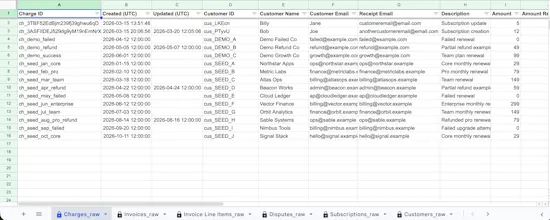
SyncStaq syncs Stripe billing data into Google Sheets — charges, invoices, invoice line items, customers, subscriptions, payouts and disputes, each in its own structured tab. What's different: most exports and scripts pull by created date, so records that change later (refunds, subscription updates, disputes) quietly go stale. SyncStaq syncs from Stripe's event stream, so your sheet updates when the data changes. Read-only Stripe access. Hourly sync. 14-day free trial.




@fi_guy Half my finance stack is still someone manually re-exporting Stripe into a sheet every Monday, so I feel this one. The thing that always breaks for us is refunds and disputes updating after the fact and quietly making last week's numbers wrong. Does the sync reconcile historical rows when a charge status changes later, or only append new data?
Hey @artem_fedorovich, definitely understand that challenge. It updates existing records so that you can see when there was a dispute or refund after the original transaction occurred. You can try it for free for two weeks and test it out, we'd love to hear if it performs the way you need it!
The thing that breaks every Stripe to Sheets sync is not freshness, it is history changing underneath you. A charge from March gets disputed in August. Does the March row mutate in place, or do you append a correction? Mutating is what people expect, and it quietly rewrites a number someone already reported to a board. Appending is honest, and it breaks every SUMIF they built on the range. There is no clean answer, which is exactly why I would want to know which one you picked and where that is documented, before I point a deck at it. Raffay's IAP point is the same shape. A third of the revenue picture is worse than none unless the sheet is labelled Stripe only right on the tab.
Hey @rabnoor_s , yes we update the original record to reflect disputes and refunds that occurred later. Please try it out and let us know if it performs the way you'd expect!
I have connected Stripe data to Sheets manually using the API before, so curious how this handles it. Does it pull via webhook events in real time or run on a polling schedule? And on the auth side: what is the minimum Stripe token scope it needs? I tend to create read-only keys for anything that touches billing data, so knowing the exact permissions up front matters.
Hey @hi_i_am_mimo, it's a combination of sources to keep the data updated. Everything is read only though for Stripe permissions.
We run subscriptions through Stripe plus Apple and Google IAP, so a Stripe-only view is maybe a third of the real revenue picture for us. Is multi-rail on the roadmap at some point, or is this staying Stripe-specific by design?
@raffay_sajjad we're starting with Stripe but investigating other sources. Would love to better understand your use case to inform our roadmap! Would you be open to connecting?
@fi_guy Happy to share the shape of it here. The friction for us is reconciling subscription revenue across Stripe, Apple, and Google, each one reports on a different cycle and none of them agree on when a period actually starts, so any single-rail tool ends up needing to be joined against two manual exports anyway. If Stripe-first is the plan for now, labeling the sheet clearly as Stripe-only, like Rabnoor mentioned above, would stop people from treating it as the full revenue picture by accident.