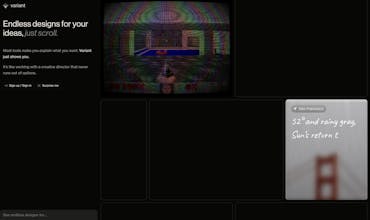
Most tools make you explain what you want. Variant just shows you. It’s like working with a creative director that never runs out of options. A tool that lets you absorb the vibe of anything you point it at and apply it to your designs
The ‘just scroll’ interaction model is interesting — most design tools put you in prompt mode, which assumes you know what you want before you’ve seen anything. Variant flips that, which is actually closer to how creative decisions get made in practice. My concern is whether the outputs stay coherent when you’re scrolling through variants or if it just becomes aesthetic noise after a while. The ‘absorb the vibe’ feature is the one I’d want to stress test — style transfer at that level either feels magical or completely off, rarely in between.
Love the "show don't tell" angle here — most design tools are still stuck in the prompt-and-pray loop, so just scrolling through generated directions feels like a much more natural way to find a vibe. I could see this being especially powerful early in a project when you don't yet have the vocabulary to describe what you want. Curious how it handles more constrained briefs though, like when you already have a brand system and just need variations within it rather than truly open-ended exploration.
Report
How does this tool handle constrained briefs and existing brand systems when generating variations, rather than just open-ended exploration?
Report
The 'just scroll' UX for design inspiration is genuinely clever — removes the blank canvas paralysis completely. Congrats on the launch! How does it handle brand-specific style constraints?
Report
Variant turning idea generation into scroll instead of prompt rewrite is smart. A pin and compare flow would make it stick, because endless options only help if you can narrow fast and carry one direction into HTML or React cleanly.
Report
Liked how you separated the prompt from the results and the way you can scroll for it to generate more, which is is convenient, I was missing a white background, under the environment modes I was not able to find that.
Report
Been using @variantui for the past few days and honestly it's one of the most impressive tools for UI/design exploration out there.
As a student developer, it really helped me move faster and experiment with ideas. But the sudden shift to paid plans for key features like code export was a bit disappointing.
Hoping @variantui considers student-friendly access or free tiers so learners like me can keep building and growing 🚀


Told
The ‘just scroll’ interaction model is interesting — most design tools put you in prompt mode, which assumes you know what you want before you’ve seen anything. Variant flips that, which is actually closer to how creative decisions get made in practice. My concern is whether the outputs stay coherent when you’re scrolling through variants or if it just becomes aesthetic noise after a while. The ‘absorb the vibe’ feature is the one I’d want to stress test — style transfer at that level either feels magical or completely off, rarely in between.
Burner
Love the "show don't tell" angle here — most design tools are still stuck in the prompt-and-pray loop, so just scrolling through generated directions feels like a much more natural way to find a vibe. I could see this being especially powerful early in a project when you don't yet have the vocabulary to describe what you want. Curious how it handles more constrained briefs though, like when you already have a brand system and just need variations within it rather than truly open-ended exploration.
How does this tool handle constrained briefs and existing brand systems when generating variations, rather than just open-ended exploration?
The 'just scroll' UX for design inspiration is genuinely clever — removes the blank canvas paralysis completely. Congrats on the launch! How does it handle brand-specific style constraints?
Variant turning idea generation into scroll instead of prompt rewrite is smart. A pin and compare flow would make it stick, because endless options only help if you can narrow fast and carry one direction into HTML or React cleanly.
Liked how you separated the prompt from the results and the way you can scroll for it to generate more, which is is convenient, I was missing a white background, under the environment modes I was not able to find that.
Been using @variantui for the past few days and honestly it's one of the most impressive tools for UI/design exploration out there.
As a student developer, it really helped me move faster and experiment with ideas. But the sudden shift to paid plans for key features like code export was a bit disappointing.
Hoping @variantui considers student-friendly access or free tiers so learners like me can keep building and growing 🚀