Launching today

Wavefunction
A minimal, open-source coding agent for your Mac
44 followers
A minimal, open-source coding agent for your Mac
44 followers
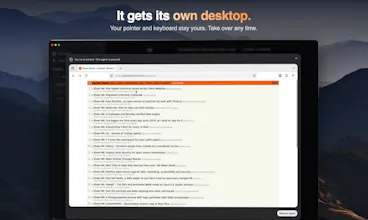
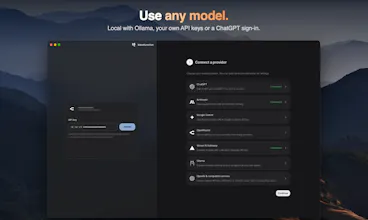
Coding agents keep turning into super apps. Wavefunction goes the other way: a minimal desktop app built for coding. Keep chatting while it works on several tasks in parallel. Use your ChatGPT subscription, Anthropic, Google, OpenRouter or a local model. Computer use runs on its own desktop, not yours. Free and open source.




Free
Launch Team / Built With


AWS Startup AdvisorPersonalized AWS guidance that meets you where you’re already building
Promoted
Hi Product Hunt! 👋 I'm Stoyan, and I built Wavefunction.
During the dark ages of AI, when Opus 5 was incomprehensible and Codex Ultra was burning all my tokens within a day, I decided to give open-source agents and models a try. Most of the open-source tools I tried were terminal-first, and desktop apps were less common. At the same time, other agent apps were slowly turning into "superapps", shipping more and more features that weren't useful to me and making the UI heavy and complex.
This motivated me to build Wavefunction: a minimal, open-source desktop app that focuses on the coding experience and cuts the features you don't need.
• Keep chatting while it works on several tasks in parallel. You never wait for a turn to end: the agent spawns subagents, steers them and combines their work
• Log in with your ChatGPT account, use an API key from OpenRouter, Vercel AI Gateway, Anthropic, Google AI Studio, or run a local model with Ollama
• No built-in browser, and computer use runs on its own sandboxed desktop
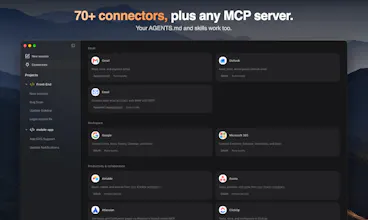
• 70+ connectors, and you can require zero-data-retention (ZDR) models
• Free and open source (MIT)
If you try it out, I'd love to hear your feedback.
What's one feature in your current coding agent you'd happily delete?
Running computer use on its own sandboxed desktop instead of mine is the detail I like most here. For your question, I'd drop anything that auto-edits files without showing a clear diff first. With subagents working in parallel, how do you handle two of them touching the same file?
@galdayan Thanks for the feedback!
The agent that spawns and orchestrates the subagents decides whether to do it in the same or separate worktree. After their work is done it makes sure to aggregate the work properly in the same worktree.
Curious, do you usually check the diffs thoroughly before you make a PR? Wavefunction allows you to see the diff and then revert to a previous point in time if things are off.
when the agent spawns subagents, can you see each one's progress separately or is it one combined stream?
@neerajnathany Yep, when the main agent spawns the subagent you can see it as a separate session and steer it yourself if you want to.
At the end, when the job is done the main agent cleans up the subagent sessions so your side navigation stays clean.
The subagent sessions are only archived so they can be searched or you can continue working in them if you need to
Love the ability to keep chatting with the agent while it works. Definitely aligns with how I think through tasks
@deckel_israeli Thanks for your feedback!
Agreed, waiting for the current session to finish is a major productivity killer imo.
To answer your question: the built-in browser. I already have a browser — I don't need my coding agent trying to be one, or a project manager, or an automation builder. What makes this feel genuinely minimal rather than just stripped-down is the model choice: ChatGPT login, an API key, or a local model with Ollama, and being able to require zero-data-retention models. That's the kind of control I'd rather have than another panel in the app.
@jcbuilds Thanks for the feedback!
I feel the same. I hate it when Codex or Claude opens everything in a built-in browser. Just give me the link! I want to use my own browser that I've already customized to my needs.
Any other providers that you want to see or any other features you consider mandatory?