
Calendarly
Turn your calendar into a live Lock Screen wallpaper
141 followers
Turn your calendar into a live Lock Screen wallpaper
141 followers
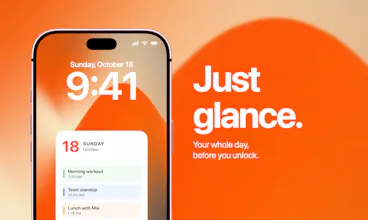
Calendarly turns your calendar into a live Lock Screen wallpaper that updates automatically throughout the day. See your schedule the moment you pick up your phone - no widgets to configure, no apps to open, no distractions pulling you away. Choose from beautifully designed templates and fully customize them to match your style, layout, and priorities. Fully private. Everything runs on-device.
This is the 2nd launch from Calendarly. View more

Calendarly
Launching today
Calendarly draws your calendar, reminders, Todoist tasks, notes and countdowns onto the iPhone Lock Screen wallpaper, and redraws it automatically through a Shortcuts automation.




Free Options
Launch Team

Atlassian LoomShow, don't just tell with Loom
Promoted

Hey Product Hunt 👋 Dmytro here, the maker of Calendarly.
I first launched here in February with a small idea: I wanted to check my calendar without unlocking my phone and getting distracted by everything else.
Back then, Calendarly had been live for two days. Writing that first launch comment was a very nervous moment for me 🙂
Months later, I’m back with a much more capable version of that same idea.
Calendarly now brings your calendar, reminders, Todoist tasks, notes, and countdowns onto your iPhone Lock Screen. There are more layouts and more ways to make it feel like yours, whether you want your whole day in view or just the next thing you need to do.
There are now widgets and Live Activities too, so you have more ways to keep your plans in view throughout the day.
If you tried the first version, I’d really love to hear what you think of it now. And if you’re seeing Calendarly for the first time, welcome! I’m here to answer questions and help you get set up.
Give it a try: https://apps.apple.com/us/app/calendarly-lockscreen-calendar/id6758898739
@dim_kat Wow I think I've just chanced upon a gem! The UI looks absolutely sick. Is there a future where you would be offering an integration with Google Calendar and Notion Calendar?
@jonasatalter Thank you! 😊 Yes, I’m already working on it! For now, any calendar you can sync with Apple Calendar will show up in Calendarly too, including Google calendars you use in. You can then turn them on or off in Calendarly’s settings.
The Shortcuts redraw is a clever workaround. How often does iOS actually let it refresh - on a schedule, or can it trigger when a new event lands on the calendar?
@greylightshines You set the times yourself, whenever you’d like it to update 😊 The shortcut refreshes both the wallpaper and Live Activities, which also lets us keep them going beyond the usual 8 hours.
You can also set it to run when you close your calendar app. So if you add an event and leave the app, it updates right after.