

Netfox 0.6 — the redesign drop 🦊🎨

Hey everyone 👋
Netfox 0.6 is out, and it's the one where the whole app got a new face.
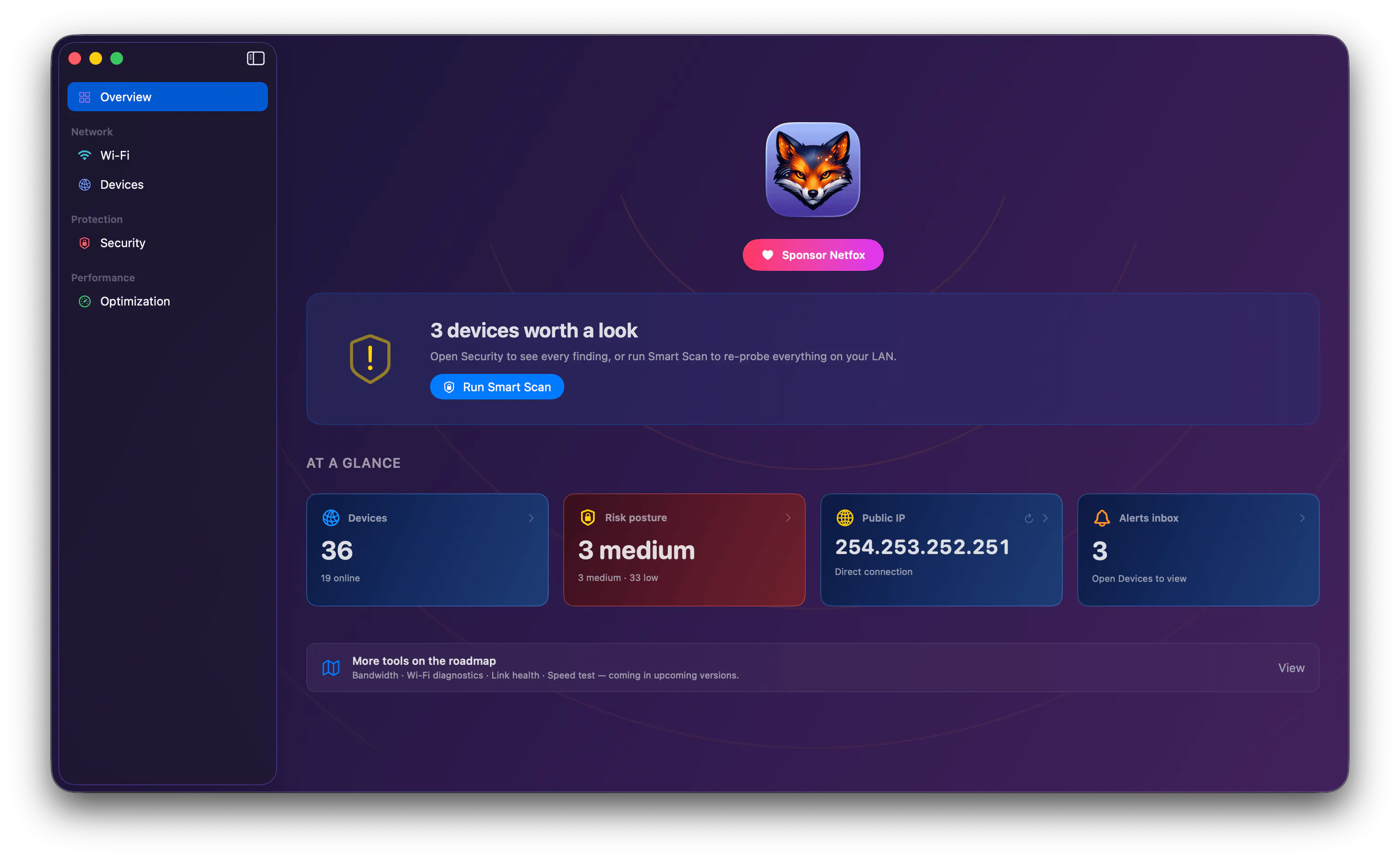
Netfox watches your home network — every device, when it joined, what it's exposing — and lives quietly in your menu bar. This release is mostly about how it feels to use:
🎨 A living, dark canvas. Every tool now has its own gradient — violet on the Overview, teal on Wi-Fi, blue on Devices, red on Security, green on Optimization — so a glance tells you where you are. The sidebar floats as translucent glass that picks up the current tool's colour, and the whole window reads as one continuous surface instead of a pile of grey panels.
🖱 The menu bar got clickable. Those status cards in the popover (devices, risk, public IP, alerts) are now live links — click one and the main window opens right on that section, even if you'd closed it. The little live traffic chart and one-click IP copy are still there.
⌨️ Shortcuts that follow you. Refresh, Probe Ports and Alert History used to only work on the Devices tab. Now they work from anywhere.
✨ And a polish pass everywhere — the device list, the Wi-Fi list and the Security views all share the new look, search sits where you'd expect, and cards lift on hover so it's obvious what's clickable.
Free, native, no account, nothing leaves your Mac. macOS 15+.
If you're on an earlier build it'll auto-update — and I'd genuinely love to hear which gradient is your favourite, or what you'd want the menu bar to show next 👇
Replies
I'd love to hear more about the thinking behind the new visual choices and workflow improvements
octoscope
@asheer_ahmad Great question, happy to get into it 🙏
Tbh the old UI worked but it was kinda forgettable — just a bunch of grey panels stacked on top of each other. I wanted Netfox to be something you actually enjoy opening 😊 and easier to move around in at the same time. So the redesign was chasing both: make it look nicer AND make it more usable. The cool part is one idea covers both — every tool now has its own gradient (violet on Overview, teal on Wi-Fi, blue on Devices, red on Security, green on Optimization). It's not just for looks, the colour basically tells you where you are. So pretty + usable ended up being the same decision instead of a tradeoff. Went full dark, CleanMyMac vibes, so the whole window feels like one surface instead of a pile of boxes, and rebuilt the shell on the native macOS split view so the sidebar floats as glass that picks up the current tool's colour.
On the workflow side, 2 things were bugging me. First, the menu bar was basically read-only — now those popover cards (devices, risk, public IP, alerts) are clickable, tap one and the main window opens right on that section even if you'd closed it. So it's a launchpad now, not just a dashboard. Second, Refresh / Probe Ports / Alert History used to only work while you were on the Devices tab lol — now they follow you everywhere.
Not gonna lie, a few bits were a pain 🤬!! Getting a single gradient to bleed all the way up into the titlebar on both macOS 15 and 26 was fiddly (Tahoe wraps toolbar stuff in its own glass capsule, so the title had to be drawn differently). The native lists also paint their own background, so on a gradient they showed up as ugly grey rectangles until I forced them transparent. And the menu-bar → window deep link was trickier than it looks, since the popover lives in a totally different window than the main UI, so a click has to open AND route a window that might not even exist yet.
What got better imo? Mostly you never lose your place anymore thanks to the colour coding, and it finally feels like ONE app instead of a stack of windows. More native but also more "us", the menu bar actually earns its spot, and the global shortcuts kill a bunch of tiny frictions. First version that genuinely feels like Netfox tbh.
Curious which gradient's your fav btw, and what you'd want the menu bar to show next 👇