
Launched this week

Mailero
Turn support emails into tickets
143 followers
Turn support emails into tickets
143 followers
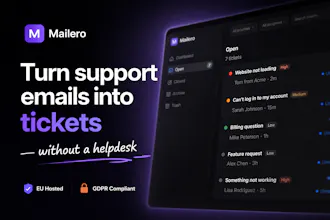
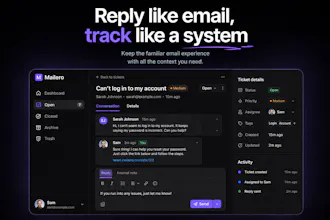
Most helpdesks are overkill. Mailero lets you manage customer support directly from email — just forward your inbox and start replying to tickets instantly. No setup, no complex workflows, no bloated features. Built for solo founders who want fast, simple support. EU hosted and GDPR compliant.




HeyForm
@mazirar I’m curious how you handle spam emails.
The biggest headache for me with my helpdesk is all the marketing emails I get every day. I never signed up for them, and no matter what I do, they keep coming. Deleting them takes up so much of my time.
@itsluo Thanks for bringing this up — we had the exact same problem.
One of the biggest pains when building Mailero was dealing with all the spam and cold outreach emails that end up in support inboxes. It quickly becomes noise and wastes a lot of time.
In Mailero, we handle this by automatically detecting spam using AI (Anthropic) on every incoming email. Messages are classified and moved out of your main inbox, so you only see real customer conversations.
You can also review them anytime or mark something as “not spam” if needed.
@mazirar Congrats on the launch! As a solo founder juggling multiple inboxes, do you see easy ways to tag/route tickets from different domains without workflows? Super curious on that front.
How are you handling things like prioritisation or tracking ongoing issues without the typical helpdesk workflows?
@becky_gaskell Great question 👋
The goal with Mailero isn’t to remove structure — it’s to remove unnecessary complexity.
Instead of workflows, we keep things simple but effective:
• Each email becomes a ticket with a clear status (open, closed, etc.)
• You can set priorities and categories to organize what matters
• Conversations are threaded, so you always have full context
• There’s a clear “awaiting reply” vs “needs action” view to track ongoing issues
So you still get visibility and control, just without automation rules or workflow builders.
Curious — what kind of tracking or prioritization do you rely on today?
Solo founder here, and this def pops out to me. Every helpdesk I tried felt like it was designed for a 50 person support team and I just needed to reply to emails without losing track of what I already answered. The forward and reply approach is smart, no migration or setup headache. How does it handle when a customer replies to an old thread weeks later, does it reopen the ticket automatically?
@keith_hiyamojo Love this — that’s exactly the problem I had as well.
Yes, Mailero handles this automatically. If a customer replies to a closed ticket, it will reopen the ticket so you don’t miss anything.
For open tickets, you can also configure when they should be auto-closed after inactivity. The default is 72 hours, but you can change this in settings based on how you work.
The idea is to keep things simple while still making sure conversations don’t fall through the cracks.
The positioning here makes sense, I think. Zendesk and Intercom are genuinely overkill for someone managing support solo, and the forward-and-reply mechanic removes almost all the friction of getting started.
When you respond inside Mailero, does it come from your original email address or a Mailero one? That's not a small detail. The entire appeal of something like this over a traditional helpdesk is that it still feels personal and direct.
I'm also wondering how volume plays into this. The solo founder framing makes sense at 10-20 tickets a week, but what does it start to feel like at 100? Is there a ceiling where it breaks down, or is that intentionally out of scope?
Congrats on the launch, Mohammed.
Superrrr!!! Is there an integration with JIRA and Notion? Our Tech uses JIRA while the product team uses Notion. It'd help if we could reroute engineering tickets on JIRA and product/UX issues on a basic task manager.
Best of luck! Rooting for you guys!
Sweet... The "just forward your inbox" mechanic is genuinely clever... most helpdesk tools make you rebuild your whole email setup before you can reply to a single customer... this is the opposite of that.
Curious how the reply side actually works though... when you respond to a ticket inside mailero, does the customer see it coming from your original email address or from a mailero one? that'd matter a lot to me. keeping it feeling like a direct reply rather than a ticketing system autoresponse is half the reason to avoid the big tools in the first place.
Get started button is not working? https://mailero.com/pricing
HeyForm
@saaswarrior It works for me.